
What Is an ATS-Friendly Resume? What the Software Reads


On this page
An ATS-friendly resume is one an applicant tracking system can read as plain text and file into the right fields. That is the whole definition.
An ATS is the software an employer uses to receive applications — Greenhouse, Ashby, Lever, Workday. The first thing it does with your document is try to pull your name, your job titles, your dates and your skills out of it and into a database. If it can read them, you are searchable. If it can’t, you are a file somebody has to open by hand.
Almost everything written about this is about fonts and margins. Those matter a little. The thing that actually rejects you without a human involved is somewhere else entirely, and it is documented in public by the companies that build these systems.
What an ATS actually does with your resume
It parses. It does not score you out.
Greenhouse publishes the mechanics, which is convenient, because it is the second-largest source of job posts in our own database. It accepts .doc, .docx, .pdf, .rtf and .txt files up to 100 MB. It then tries to read them, and it lists what makes that fail: a file that is too large, letters with spaces between them, graphics, an image uploaded instead of a document, complex layouts built out of tables, and section structure that isn’t clear.
Read those two pages together and there is a trap sitting between them. You may upload 100 MB. Greenhouse “can’t parse resumes larger than 2.5MB.” A 6 MB resume uploads perfectly and arrives unreadable.
Now the part the formatting guides leave out: what a failed parse actually costs. That page is written for the employer’s side of the system, and its remedy is the tell — when the parse fails, “you’ll need to manually input the candidate’s details into the fields.” The file is still there. What is missing is the structured record built out of it, and somebody has to type that in by hand.
Nothing in that describes a rejection, automatic or otherwise. A resume the parser cannot read leaves you thinner in the database than the candidate next to you — fewer fields filled, less to match a search against. That is a real disadvantage, and it is a completely different problem from the one most formatting advice is solving.
What actually rejects you automatically, and it is not your font
Applicant tracking systems do reject people automatically. It just has nothing to do with your document.
In Greenhouse the feature is called auto-reject, and the documentation is specific: the employer writes a question on the job post, picks the answer that should trigger a rejection, and the system rejects anyone who gives it. It works with three question types — Yes/No, single-select and multi-select. A rejection reason gets attached. And per that same page, anyone who would normally be notified about a new application is not notified about an auto-rejected one.
Greenhouse’s own worked example is a driver’s licence: a haulage role asks “Do you have a Class A Commercial Driver’s License?” and rejects everyone who answers no. But the mechanism is generic, and you already know the questions built on it — the dropdown asking whether you are legally authorised to work in the country, the one asking whether you will now or in future require sponsorship, the one asking whether you can relocate.
That is where a no arrives without anyone reading anything. Not your two-column layout.
It also reframes where your effort belongs, especially if you need sponsorship. No amount of formatting changes the answer to a knockout question, and answering one inaccurately moves the problem to a later and more expensive stage rather than solving it. The effort that is actually yours to spend goes into choosing what to apply for — which is why it is worth understanding what visa sponsorship actually is before optimising anything, and worth starting from roles that signal sponsorship rather than discovering the answer one rejection at a time. With a genuinely work-from-anywhere role the sponsorship question does not arise at all, because the job has no country for an employer to sponsor you into — though where you sit still has its own rules, and those are yours to arrange.
The formatting rules that matter
With the auto-reject question set aside, the formatting advice gets short, because Greenhouse has already told us what breaks its parser.
- One column. Greenhouse names complex layouts built from tables as a cause of failure. The reading order the software infers from a two-column page is not the one your eye follows, so sidebars and text boxes carry the same risk.
- Real text, not pictures of text. An image uploaded in place of a document is on the failure list outright. A resume with your name rendered inside a graphic contains nothing to extract, and the same goes for icons standing in for section labels.
- Ordinary section headings. Experience, Education, Skills. Not Where I’ve Been and My Toolkit. Greenhouse names unclear section structure as a cause of failure, and an invented heading is the easiest way to produce one.
- Standard fonts, no letter-spacing tricks. “Spaced letters” is on the list explicitly. Manual tracking to stretch a line can turn Engineer into E n g i n e e r, which matches nothing.
- Under 2.5 MB. In practice this means not embedding a photograph at full resolution.
None of this is a design opinion. It is the vendor’s own list of what fails.
Which file format should you use?
Greenhouse accepts five formats and, on that page, does not name a preferred one. So the advice you have probably read — that PDFs are unreadable, or that Word documents are unprofessional — is folklore on both sides.
The rule that survives contact with the documentation is duller. Use whatever the form accepts, and make sure the text inside it is real selectable text. A PDF exported from Word or Google Docs is fine. A PDF that is a scan of a printed page is not, and neither is one built in a design tool that outlines the type.
You can settle it yourself in ten seconds, and there is a test at the end of this post that does exactly that.
Which keywords? Start with the post in front of you
Every guide on this subject says to use keywords from the job description. That is correct and almost useless, because it never says which ones, and there are a lot of words to choose from — the median live post in our database runs 694 of them.
So I counted. On 19 August 2026 our database held 55,851 live job posts, of which 55,053 have extracted skill terms. Across all of them there are 811 distinct terms, and the average post carries 14.2 of them.
That average is the number worth keeping. A job post is not asking for three things. It repeats fourteen, and those repetitions are the vocabulary you are being read against.
Narrowing to a single role makes it concrete. Here are the terms that recur most across the 6,688 live Software Engineer posts in the same snapshot.
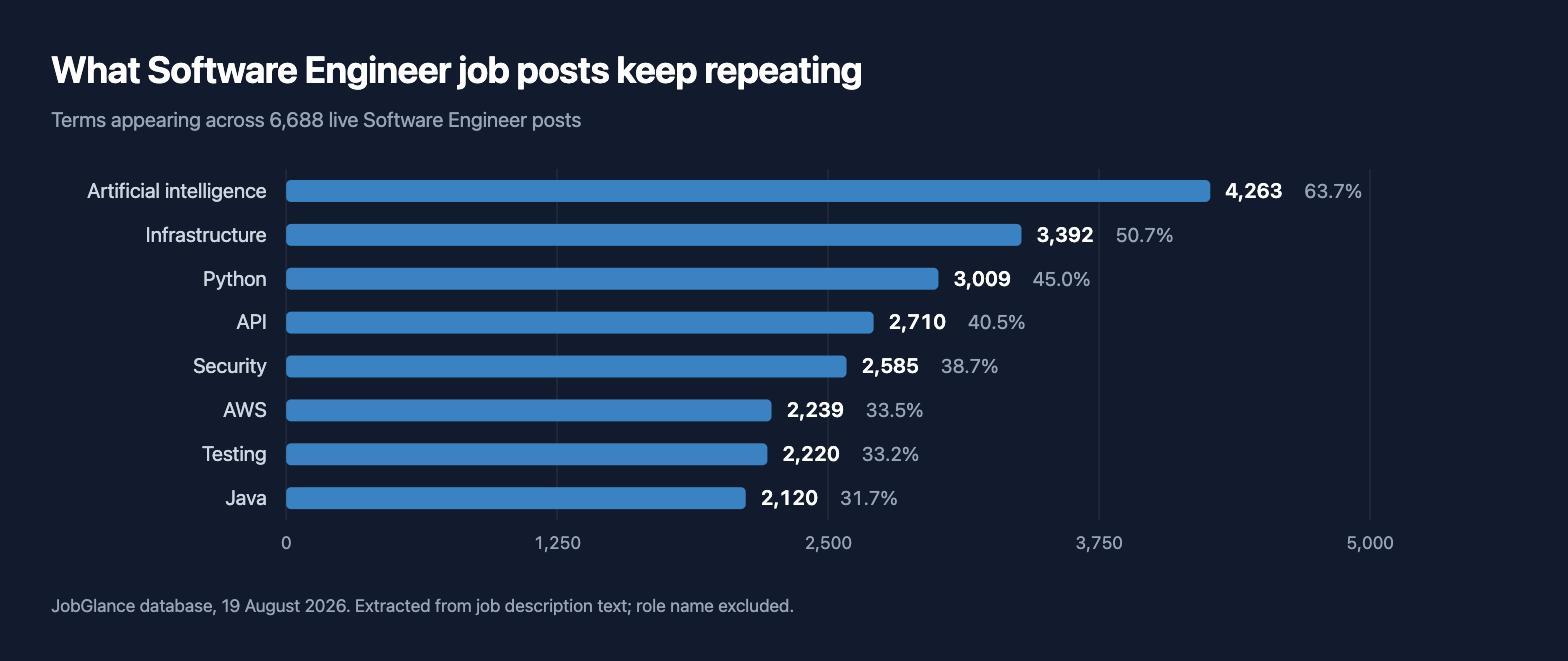
Two things are worth taking from that.
The first is that the top of the list is not a stack. Artificial intelligence leads it, ahead of every named language, and infrastructure and security both outrank Java. Only three of the eight are a named language or platform; the rest are areas of work. A resume whose skills section is a list of technologies is answering a narrower question than the posts are asking.
The second is the shape of the distribution. Eight terms, and the most common one still only appears in about two-thirds of posts for a single job title. There is no master list to copy across applications, which is why tailor your resume to the post is not a productivity tip. It is the only approach that can work against 811 terms.
Two limits on that data, both real. These terms are pulled out of job description text by software, so they are as rough as any extraction — as a check, I compared one against the raw text: the extractor puts Python in 45.0% of Software Engineer posts, and a plain search of the descriptions themselves finds it in 44.9%. Close enough to trust the rest. The extractor also returns the role name itself, which comes back on 74% of Software Engineer posts and tells you nothing except that the title appears in the post; I left it out of the chart.
Which ATS are you actually applying through?
Four names cover most of it, and you can check which one you are dealing with by looking at the URL when you click Apply.
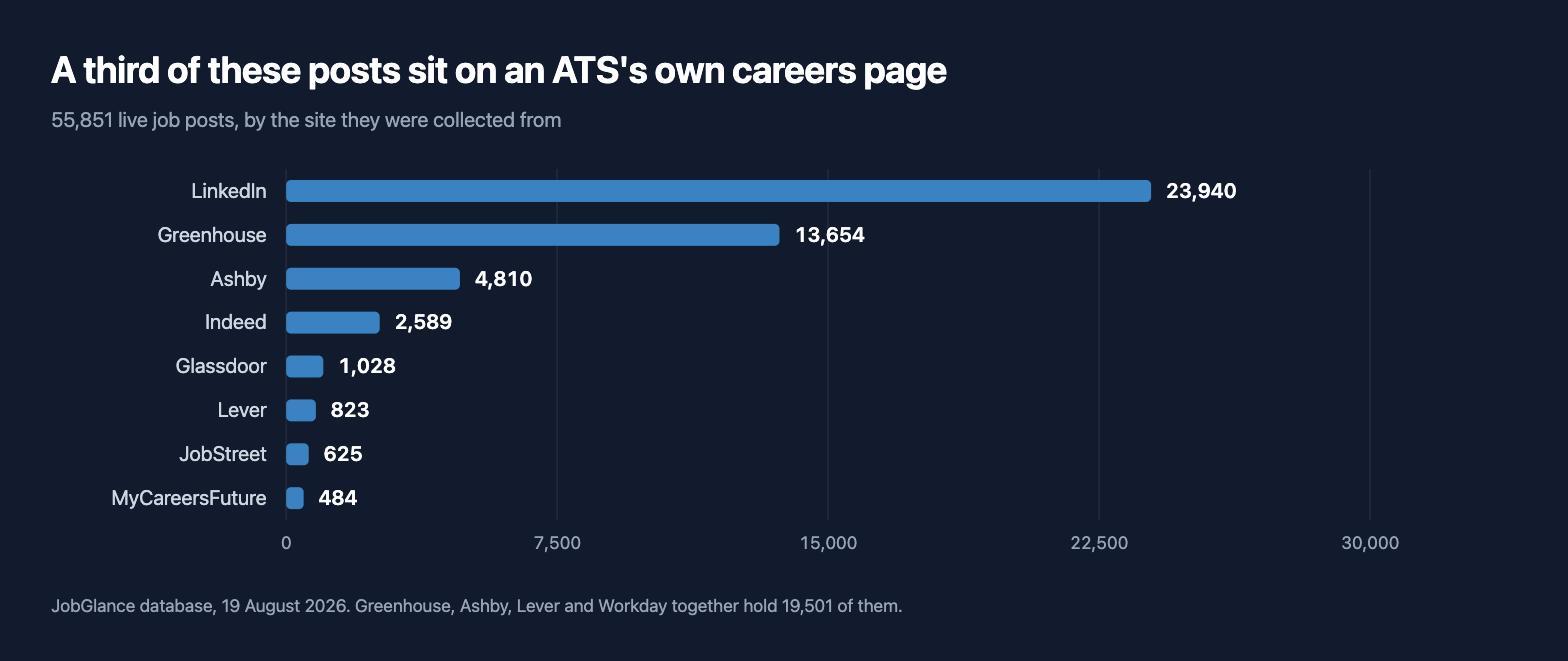
Of those 55,851 posts, 19,501 — 34.9% — were collected directly from a Greenhouse, Ashby, Lever or Workday careers page. The application URL says so: gh_jid= in the query string is Greenhouse, jobs.ashbyhq.com is Ashby, lever.co is Lever, myworkdayjobs.com is Workday.
The true share of employers running one of these is higher than 34.9%, because a listing found on LinkedIn or Indeed usually hands you off to the same four systems the moment you press Apply. Our figure only counts the posts we collected from the careers page directly.
Which matters for a practical reason: these are named products with public documentation, not a mysterious robot. Everything cited above came from a support page anyone can read.
It is also worth knowing where the famous statistic comes from. The claim that almost every large employer uses an ATS traces back to Jobscan, which checked all 500 Fortune 500 careers pages by hand in June 2025 and identified a system at 489 of them — 97.8%, not the “over 98%” it usually gets rounded up to. The methodology is stated and the figure looks reasonable. Jobscan also sells resume-scanning software, which is worth knowing when you quote it.
How to check whether your resume is ATS-friendly
Do this before you change anything:
- Open your resume, select everything, and copy it.
- Paste it into a plain text editor — Notepad, TextEdit switched to plain text, or any code editor.
- Read what came out.
That plain text is roughly what the parser gets. If your name is your name, your job titles sit on their own lines, and your dates survived intact, you are fine. If the two columns have interleaved into alternating fragments, if your contact details did not come through at all, or if a whole section vanished because it was an image — that is what the software sees, and no amount of visual polish fixes it.
Fix what the test shows, then stop. Beyond real text in one column with ordinary headings, extra effort on this goes into a document nobody grades.
The other half is the tailoring, and that is genuinely repetitive work: rewriting the same resume against fourteen terms per post, one post at a time. JobGlance’s ATS Resume Builder is free and scores a resume against five concrete checks rather than a black-box number, then rebuilds it in single-column templates and tailors it to a specific job. That last part is the tedious bit, and it is the reason the tool exists.
Common questions
What does “ATS-friendly” mean on a resume? That an applicant tracking system can extract your details from the file — name, titles, dates, skills — and put them in the right database fields. It is a statement about machine readability, not about how the resume looks to a person.
How do I know if my resume is ATS-friendly? Copy the whole thing and paste it into a plain text editor. What comes out is close to what the parser sees. Scrambled columns, missing contact details or a vanished section mean the file needs work.
Can an ATS read a PDF? Yes. Greenhouse lists .pdf among the formats it accepts, alongside .doc, .docx, .rtf and .txt. What it cannot read is a PDF containing no real text, such as a scan or an exported design with outlined type.
Does an applicant tracking system reject resumes automatically? Greenhouse’s auto-reject rules run on answers to job post questions — Yes/No, single-select, multi-select — chosen by the employer, not on the content of your resume. A resume the parser cannot read is a different problem: Greenhouse documents that as missing data somebody has to enter by hand, not as a rejection.
Do I really need a different resume for every application? The posts vary more than people expect. In our snapshot the average post carries 14.2 skill terms drawn from a pool of 811, so a resume written to match one post is a poor match for the next. Tailoring the wording of your experience to the post in front of you is doing more work than any template choice.
Are ATS-friendly resume templates worth using? A single-column template with ordinary section headings saves you from the layout problems above, so yes as a starting point. It does nothing about the wording, which is the part that decides whether you turn up in a recruiter’s search — and it does nothing at all about the application questions, which are where the automatic rejections actually happen.
Database figures: JobGlance, 19 August 2026, covering active job posts only. Skill terms are extracted from job description text and, like any extraction, are approximate; the cross-check above is the honest measure of how approximate. Vendor documentation was checked on the same date.
Keep reading


