 Chrome Extension
 See how your resume matches
any job description.
Upload your resume once. Every job description you open is scored 0–100 against it, gaps highlighted.
One feature, two views
The score tells you what your fit is. The highlights show you where — so you know what to address before you apply.
The Score — 0 to 100
A single number on every job page tells you how closely your resume aligns with the role's requirements. Decide whether to apply in seconds, not after reading the whole posting.
The Highlights — green vs red
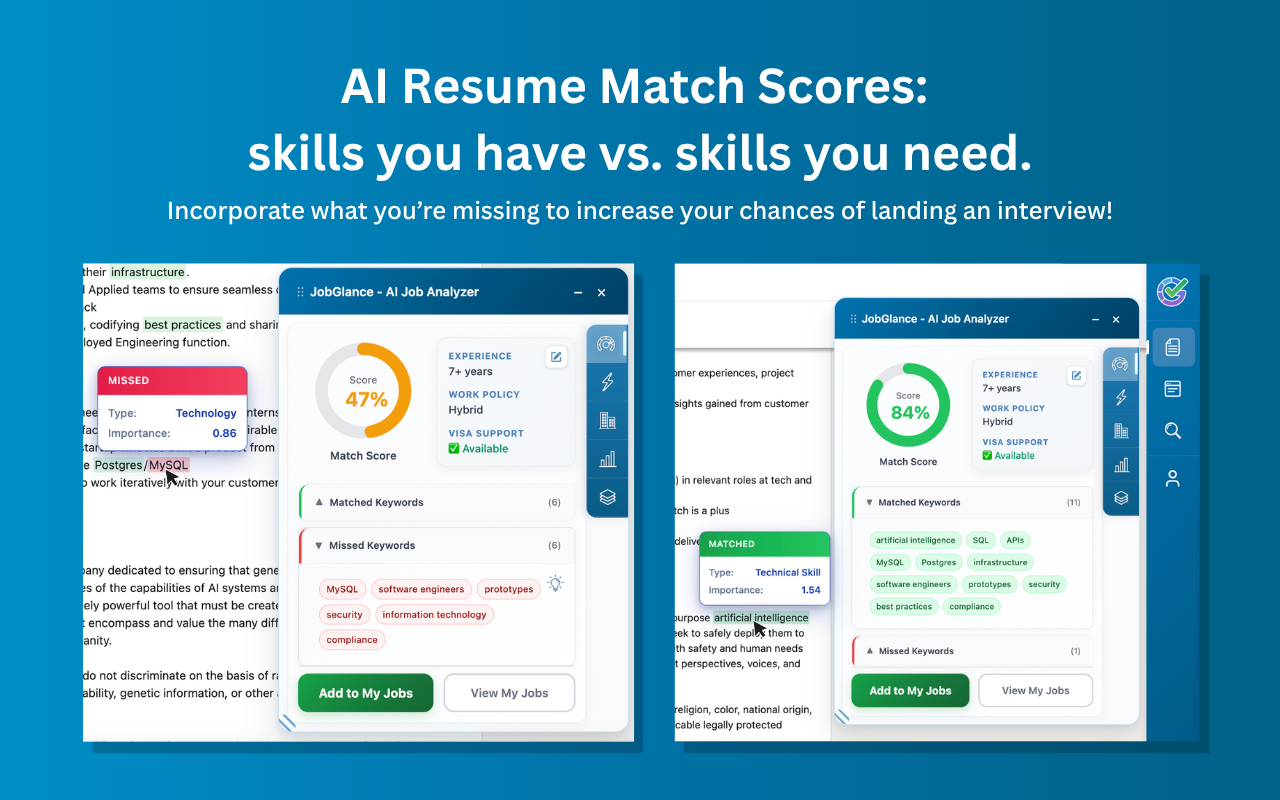
Skills you match are highlighted green; skills you're missing are red — directly inside the job description. Hover any keyword to see its type and how much it matters for this role.
How to tailor your resume to a job description
Everyone is told to tailor their resume to the job description. Almost nobody is told how, so it usually means reading the posting twice and hoping something sticks — which is slow, and gets slower with every application.
The mechanical part is comparing two lists: what the posting asks for, and what your resume already proves. JobGlance does that comparison the moment you open a listing, scores the overlap 0–100, and highlights the matched and missing skills inline in the description itself. You still write every word — but you are editing against a specific, visible gap rather than a vague instruction.
How it works
Upload your resume once
Stored locally in your browser. No account needed, nothing sent to a server to use it.
Open any job listing
On LinkedIn, Indeed, Glassdoor, Wellfound — or any career site. The extension activates automatically.
See your score & highlights
Your 0–100 fit appears in the sidebar and matched/missing skills light up in the description instantly.
Hover, improve, reapply
Hover any red keyword to see its type and ATS weight. Add the high-weight missing ones to your resume to raise your score — and your interview odds.
No tab-switching.
No guesswork.
Everything happens right on the page you're already reading. The highlights map your resume onto the real job description, so you can tailor your application to the skills that actually matter for this role.
Confirms your strengths for the role at a glance.
Shows exactly what to address. Add the high-weight missing keywords to your resume to raise your score — and your odds of landing an interview.
Who it's for
For anyone applying at volume who wants to spend their time on the right roles. If you've ever read a full job description only to realize at the bottom that you weren't a fit, the match score gives you that verdict up front — on every listing, everywhere you browse.
Questions about Resume Match Score
It has deep support for LinkedIn, Glassdoor, Indeed, Wellfound, JobStreet, WeWorkRemotely, WorkingNomads and Jobspresso — plus intelligent extraction on virtually any other career site.
Locally, in your browser. It's used only for matching, never sold, and never used to train AI. The extension stays completely dormant on non-job pages.
Yes — the score, keyword highlights, visa/remote detection and tracking are all free and unlimited in the Chrome Extension. No account required.
Similar concept, but the algorithms differ under the hood — so scores can vary slightly. The on-site score uses keyword matching; Smart Match goes deeper with semantic analysis of your full background. That said, they correlate strongly in practice, since keyword overlap is a core component of Smart Match scoring too.
Know your fit before you apply.
Start for free · No credit card required · Pro from $12.99/mo