 Web App · Free
 Build an ATS-friendly resume.
Free, and built to pass.
Score any resume against real ATS checks, then rebuild it in a template that's ATS-friendly by construction.
How to make an ATS-friendly resume
Start your way
Upload an existing resume, paste it in, or start from a blank template. Whatever you have, you're editing in seconds.
See your ATS score
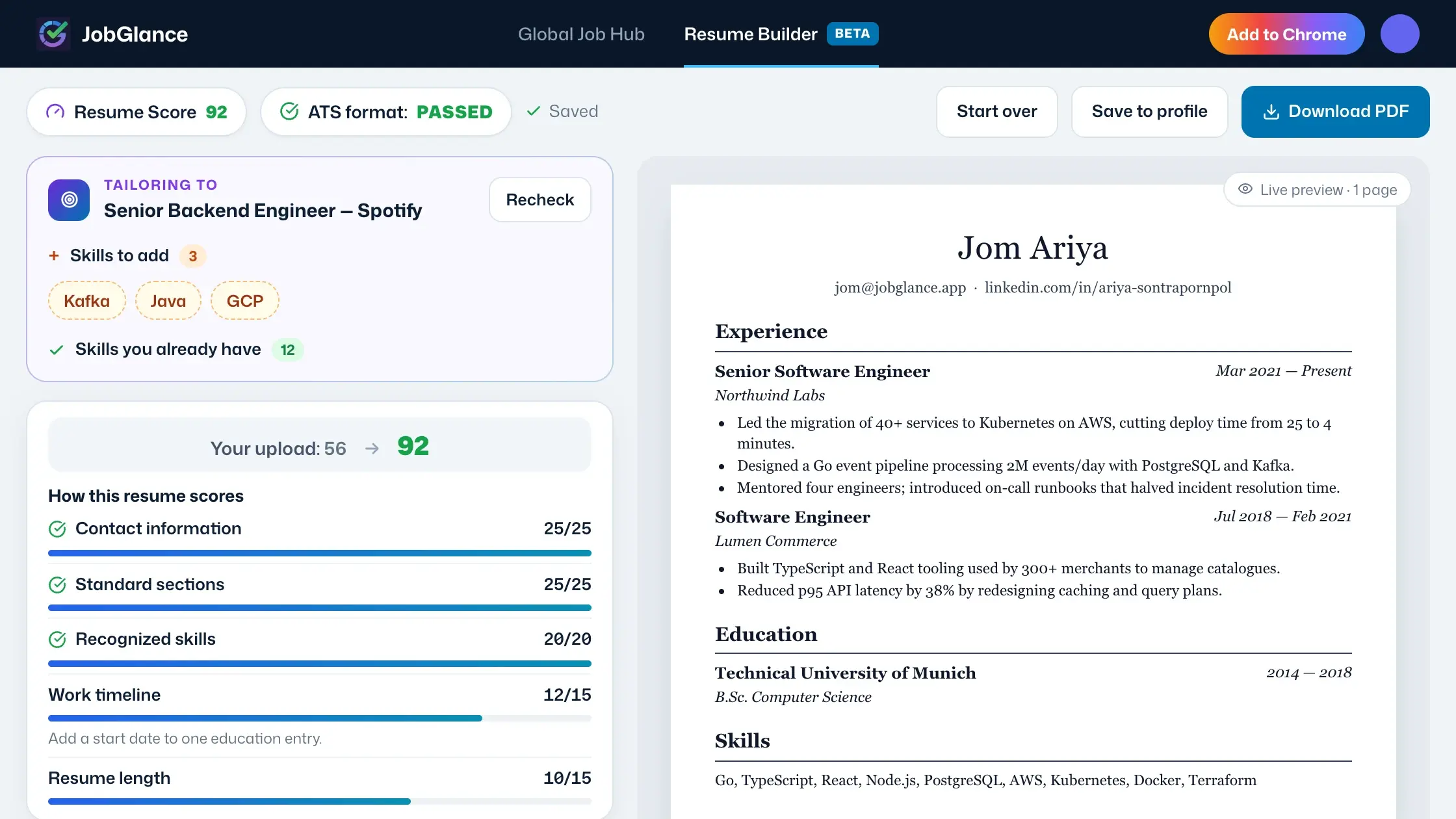
An honest 0–100 across five concrete checks — no black-box AI number. See exactly what's costing you points and why.
Rebuild in an ATS resume template
Pick a hand-picked, single-column ATS resume template. Every one is ATS-friendly by construction: white background, standard fonts, real text.
Export ATS-clean
Download a text-preserving PDF — real, selectable text that parsers read correctly, never a flattened image they choke on.
A score you can trust. Not an AI guess.
Your resume is graded on five concrete checks that ATS parsers actually care about — a fixed rubric, not a black box. Upload your old version, rebuild it here, and watch the score climb from where you started toward an honestly-earned near-perfect.
Name, email, phone, and links that parse cleanly into every ATS field.
Experience, education, and skills — labeled the way parsers expect to find them.
Recognised keywords drawn from the same dictionary we score real job listings against.
Clear start and end dates on every role, so your history reconstructs correctly.
Right-sized for your experience — long enough to matter, short enough to read.
Every ATS resume template is ATS-friendly by construction.
Most resume tools let you build something the parser can't read, then hope for the best. Ours can't — every ATS resume template is engineered to clear the checks ATS software runs, so an ATS-friendly resume isn't a feature you toggle on. It's the only thing you can build.
Single column
No side-by-side columns for parsers to scramble. Your resume reads top-to-bottom, the way software expects.
Standard fonts, black on white
Two standard fonts, dark text, plain background — maximum legibility for both parsers and the recruiter who reads next.
Real, selectable text
The exported PDF is true text, never a picture of a resume — so every word lands in the ATS, not into a void.
Tailor your resume to the job description. Without faking it.
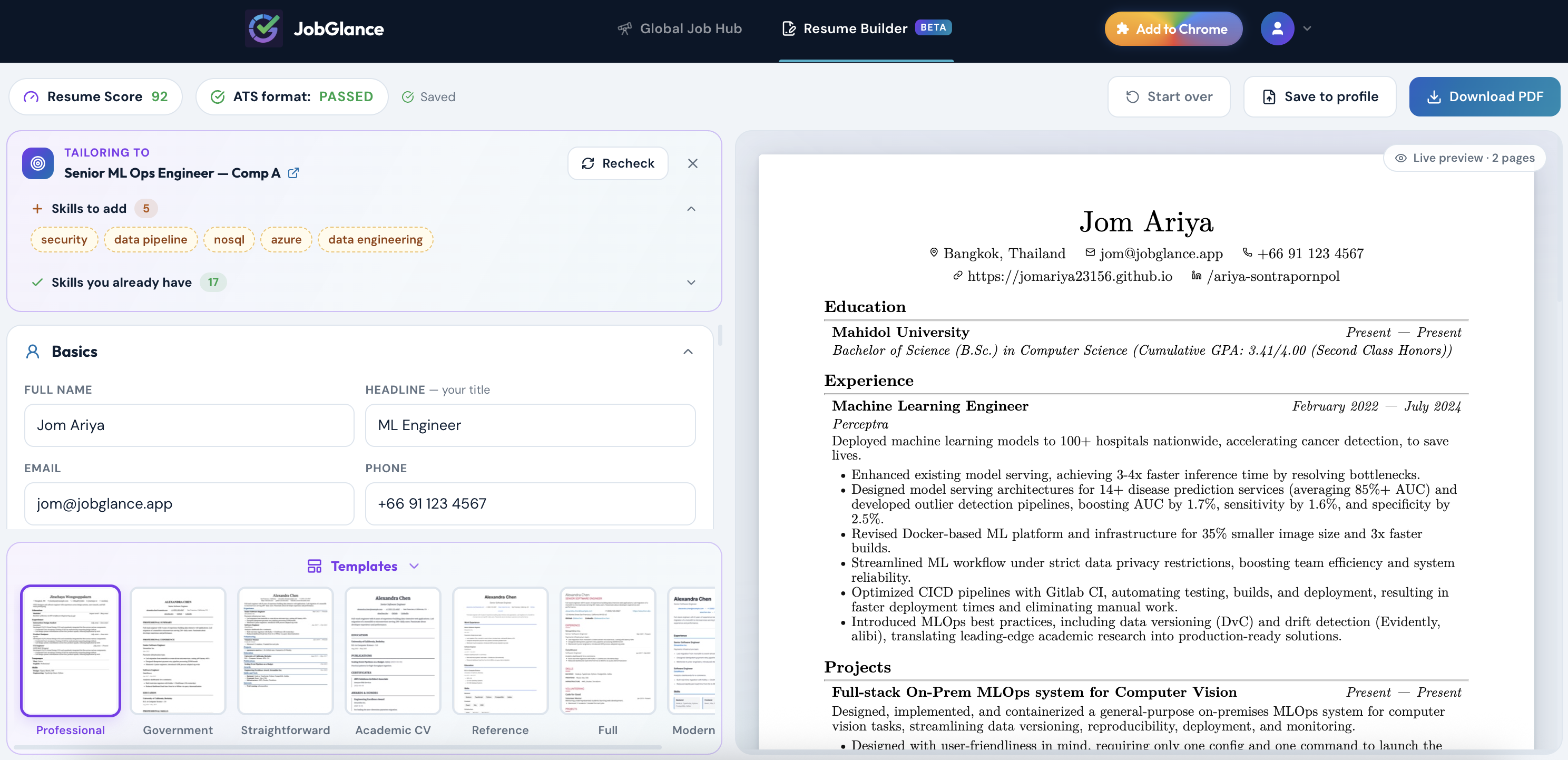
See a role worth your time on JobGlance? Build a resume targeted to it in one click, right from the job post — so you know exactly which skills to focus on.
- 01
Spot a role
From any job post in the JobGlance Web App, build a resume targeted to it in a single click.
- 02
See the gaps
You'll see the skills the role wants — the ones you already have, and the ones you're missing — so nothing is a guess.
- 03
Close them, honestly
Add the skills you genuinely have, recheck your score against the live draft, and export.
For job seekers who keep getting auto-rejected and can't tell why — freshers writing a first ATS resume, experienced candidates whose formatting is quietly costing them interviews, and anyone applying internationally where a parser reads you long before a person does. If you'd rather send ten strong, tailored applications than a hundred generic ones, this was built for you.
Frequently asked questions
Yes. Building, scoring, the curated templates, and text-preserving PDF export are free with no limits. Auto-filling the builder from an existing resume upload is limited to a few imports per month on the free plan; typing it in or starting from a blank template is always unlimited. Pro removes the import cap.
ATS stands for Applicant Tracking System — the software employers use to read and filter resumes before a person sees them. An ATS-friendly resume simply means one that software can parse correctly: single column, standard fonts in black on a white background, standard section headings, and real selectable text rather than an image. Every template here is built that way by construction, so a resume you build clears those rules by default, not by luck.
It's a fixed rubric across five checks — contact information, standard sections, recognized skills, work timeline, and length — that sum to 100. There's no AI black box: you can open the breakdown and see exactly what each check awarded and why. Upload an existing resume and you'll see its old score next to the rebuilt one.
No. When you tailor to a job we show you the exact skills it wants and score your draft, but you write and edit every line. We deliberately don't do one-click auto-generated resumes or mass applications — JobGlance is built for the applications worth making, not spray-and-pray.
Yes. Drop in your current PDF or DOCX to get an instant ATS score, then rebuild it in an ATS-clean template. Prefer a fresh start? Begin from a blank template instead. You can also save any resume you build to your profile, and it becomes the resume Smart Match ranks jobs against.
Most tools treat 80 out of 100 and up as a strong, passing score. Because every template here is ATS-friendly by construction and the rubric rewards complete, well-structured content, a resume rebuilt in the builder typically lands in the 90s — and you'll see the exact number right next to your old score.
Keep it to a single column, use standard fonts in black on a white background, label sections with standard headings, include the keywords the job actually asks for, and export as real selectable text rather than an image. The builder handles all of that for you automatically, so you never have to remember the rules.
Your next resume, ATS-clean and honest.
100% free · No credit card required · ATS-friendly by construction