Job Search for International Students: A Practical Playbook


On this page
One fact changes the whole job search for international students, visa status is the first filter, not the last. In the U.S., employer-sponsored postings fell from 10.9% in 2023 to 2.6% in 2026 in a report citing Handshake data, and 74% of employers in that same coverage said they avoid hiring international students because visa complexity makes the process feel risky (CNBC). If you start by blasting applications at random listings, you’re doing unpaid administrative work for employers who were never going to interview you.
The right approach is blunt. Check eligibility first, then sponsorship, then location, then tailor the resume and outreach. That order saves time, cuts rejection noise, and keeps you focused on roles you can take.
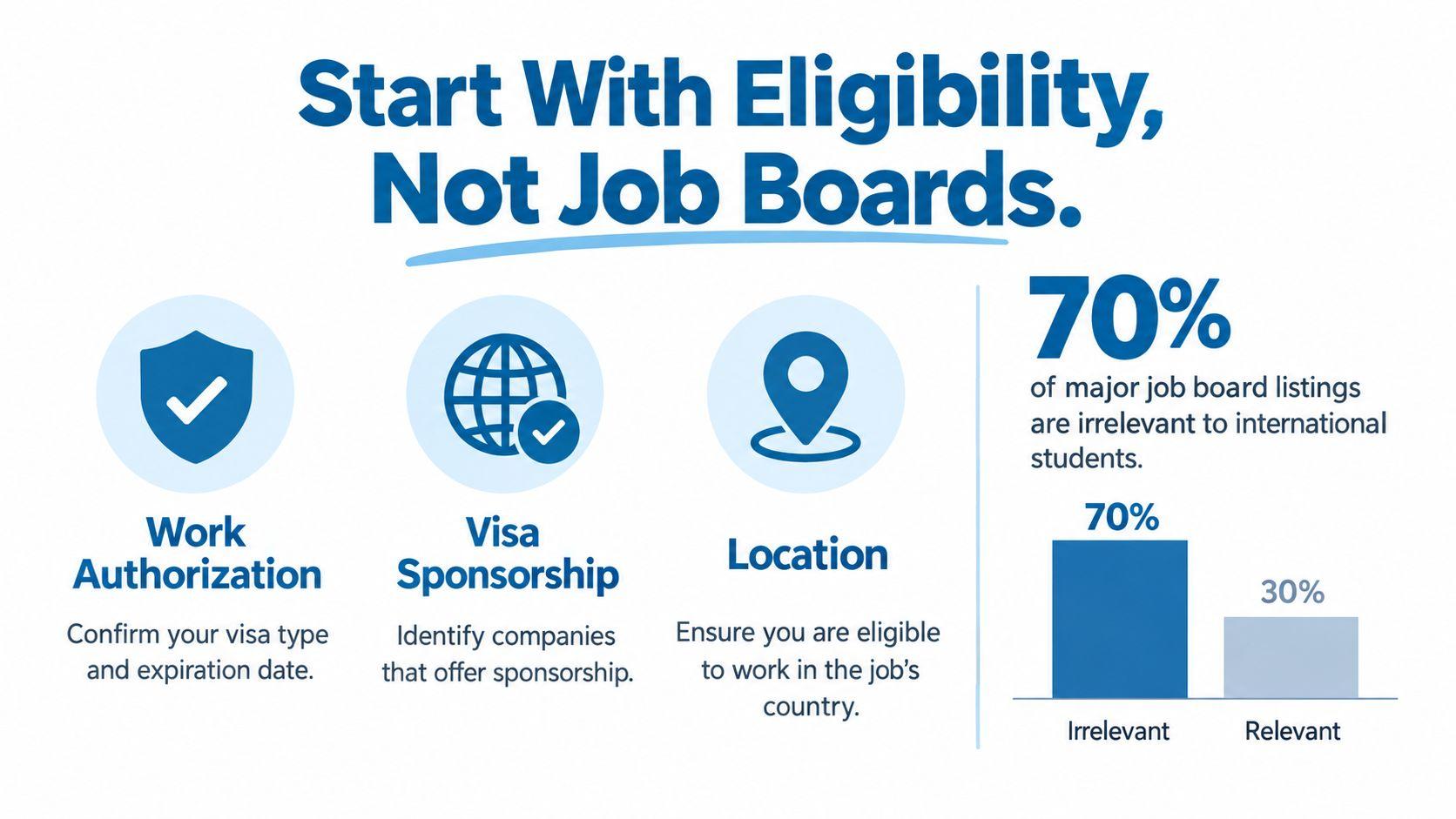
Start With Eligibility, Not Job Boards
Most international students waste energy on jobs they were never eligible to receive. That happens because they start with a title search, not with the three questions that decide whether an application can move forward, work authorization, visa sponsorship, and location eligibility. If any one of those fails, the rest of the application barely matters.
Build a hard filter before you browse
Read every listing like a lawyer, not like a hopeful candidate. Flag phrases such as “must be authorized to work,” “no sponsorship available,” and “local candidates only.” Those phrases are not background noise, they are the decision.
Australia shows why this matters. Student visa conditions historically allowed international students to work up to 40 hours per fortnight during study periods and unlimited hours during scheduled breaks, later updated to 48 hours per fortnight, while research students could work unlimited hours, and graduates on a Temporary Graduate Visa can stay for two to three years depending on degree level, with some shortage-field graduates eligible for an additional two-year extension (Australian Department of Education report). Those rules define whether you can search broadly or whether you need to stay inside compliant part-time work while studying.
Practical rule: if the listing doesn’t clearly fit your visa and location, treat it as a no.
Stop applying to the wrong pool
The default approach is to open a job board, sort by newest, and start applying. That burns time fast because it creates false volume. A better routine is to fill out a one-page eligibility checklist before you touch a board, then only keep roles that pass all three filters.
Use this checklist every time:
- Work permission: What visa or status do I have today, and when does it expire?
- Sponsorship need: Does this role accept my current status, or would it require employer sponsorship?
- Location fit: Am I eligible to work in the country, region, or time zone named in the posting?
For a targeted source of sponsored openings, use the dedicated visa-sponsorship category on JobGlance instead of relying on keyword luck. That kind of filter-first browsing keeps you from spending hours on listings that were never open to you.
Search Where Sponsorship and Remote Are Real Filters
Most job boards waste your time because visa fit stays buried. You still have to open too many postings before you know whether a role can work for you. Use platforms that surface sponsorship and remote eligibility in the filter itself, then use employer history to separate real opportunities from noise.
Use platforms that expose the filter up front
LinkedIn, Indeed, MyVisaJobs, H1BData.info, Relocate.me, Working Nomads, and Wellfound all serve different purposes. Some let you filter directly for sponsorship or remote work. Others are better for checking whether an employer has hired international candidates before, or whether the role is tied to a country, region, or time zone. Keyword searches for “visa sponsorship” are weaker because they catch wording, not intent.
| Platform | Sponsorship Filter | Remote Filter | Best Use |
|---|---|---|---|
| Yes, where available through employer or job filters | Yes | Broad search, alumni targeting, recruiter discovery | |
| Indeed | Yes, where available | Yes | High-volume filtering and quick scans |
| MyVisaJobs | Employer sponsorship history | No | Building a sponsorship target list |
| H1BData.info | Sponsorship history and employer patterns | No | Checking whether a company has a visa track record |
| Relocate.me | Yes, relocation-focused roles | Some roles | Relocation-friendly and international openings |
| Working Nomads | No | Yes | Remote roles for distributed teams |
| Wellfound | Sometimes via employer posting details | Some roles | Startup roles, especially when you want direct outreach |
That table only helps if you use it. Open the right platform first, save your search filters, and stop treating every board like it deserves your time.
For a live remote-first starting point, the worldwide remote category on JobGlance is more useful than a generic board search because it separates remote roles by origin and eligibility instead of making you infer the rules from the title.
Save your filters and rank your search time
Do not rebuild searches from scratch every day. Save your filter combinations, then refresh them on a fixed cadence so you catch new roles early. The goal is not more browsing. The goal is cleaner signal.
Use a simple order for your sourcing time:
- Dedicated sponsorship filters on platforms that show them directly.
- Employer-history databases for shortlisting companies with a real track record.
- Keyword-only searches as a fallback, never as your main method.
That order matters because it puts eligibility first, where it belongs. The more a platform makes sponsorship and remote status visible, the less time you waste on roles that were never open to you.
Separate Domestic Remote From Truly Global Roles
“Remote” is not a yes. It is a filter. Many remote jobs still tie you to one country or one region, and that detail decides whether you should apply. A role marked remote within the US excludes most international students right away. Remote in EMEA still requires work rights in Europe.
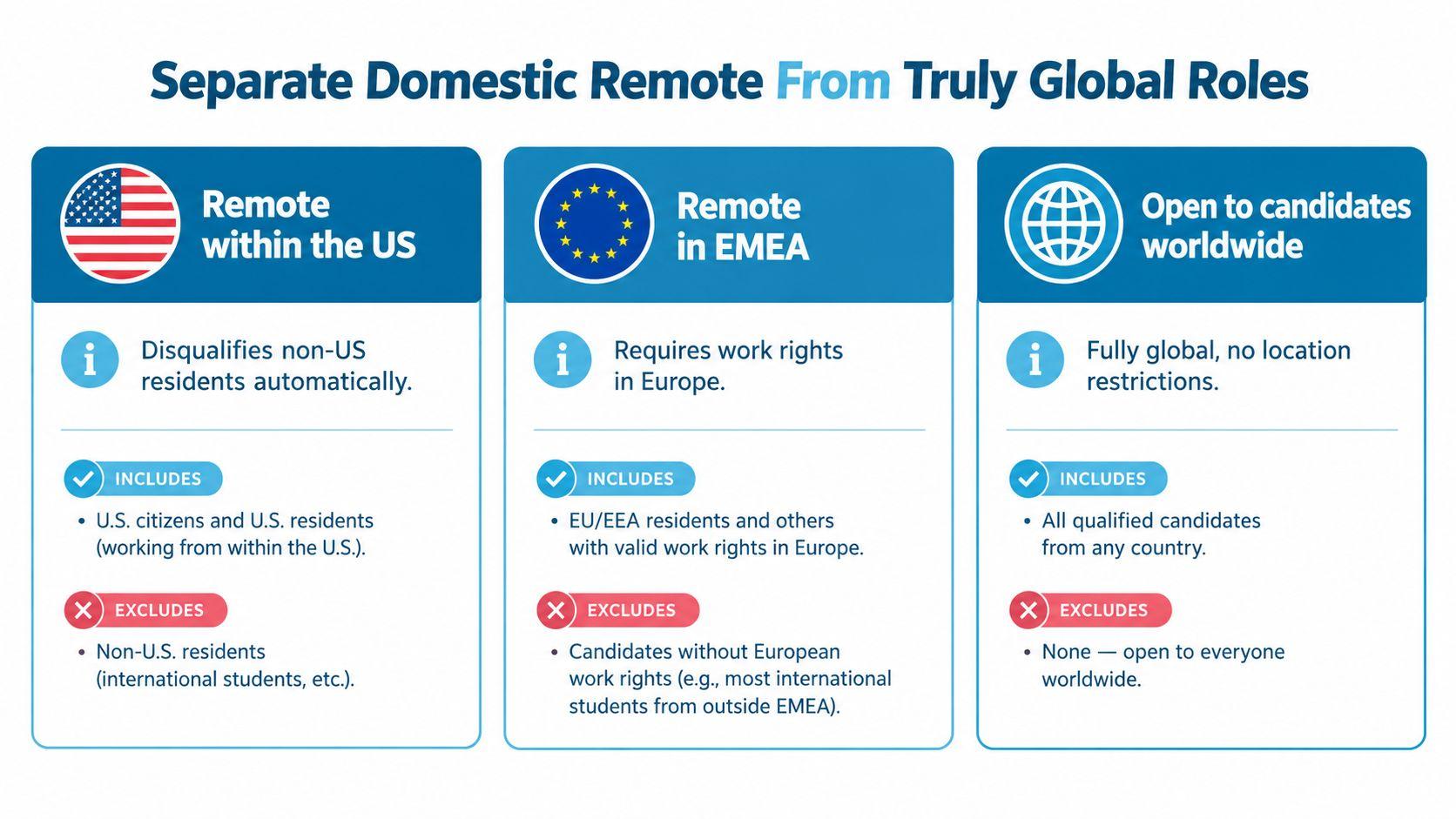
Employers use the same word for different legal setups. Some need workers in the hiring country for payroll and tax reasons. Others hire through an Employer of Record. A smaller group accepts candidates worldwide, or they bring people on as independent contractors.
Read the geography first. If the posting says remote within the US, you are out unless you already have US work rights. If it says remote in EMEA, the same rule applies for Europe. If it says open to candidates worldwide, then the role belongs on your list.
Three clues usually tell the truth.
- Location requirements: If the posting names a country, city, region, or time zone, assume that boundary matters.
- Tax and payroll forms: If the company mentions local employment paperwork, the role probably is not globally open.
- Equity and contractor language: If the offer is built around contractor terms or global engagement, that is different from standard domestic employment.
A vague posting wastes your time. A clear one saves it. If a role does not explicitly accept candidates in your country or your work status, do not assume it does.
That is why globally open sources matter. Remote-friendly boards help only when they separate domestic-remote roles from work-anywhere roles. Otherwise, you keep hitting listings that sound flexible and still shut you out at the offer stage.
Tailor Your Resume and ATS Profile to Each Role
A generic resume gives an applicant tracking system little to match. A resume gives it the exact terms the posting asks for. International students lose points here because they write around their experience instead of matching the employer’s language.
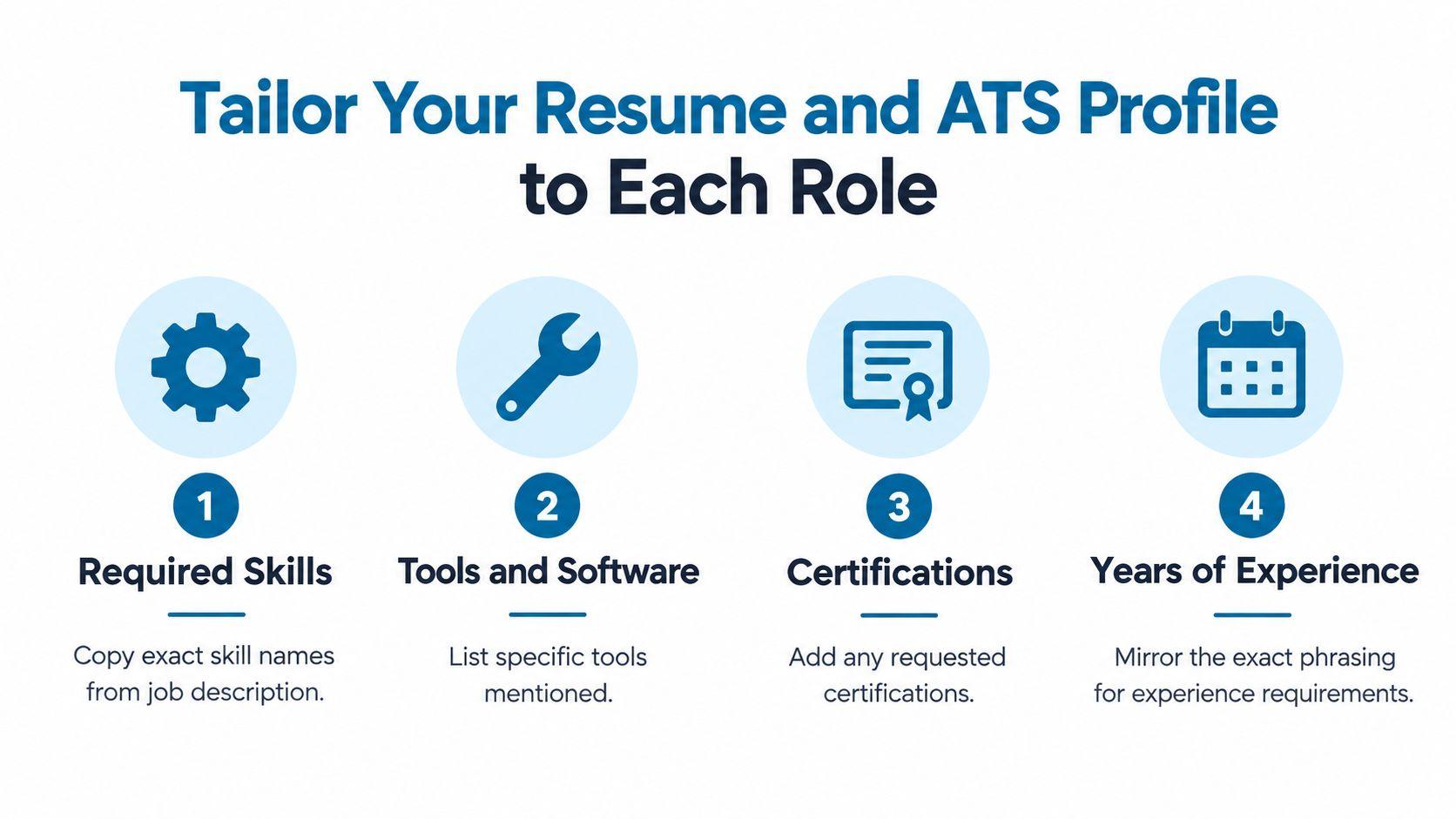
Open the job description and extract the required skills, tools, certifications, and experience phrases. Put those exact words into a working draft, then rebuild your bullets around them. Do not rewrite from campus language or from the way you described work in another market.
ATS software also cares about structure. Use a clean one-column layout, standard headings, and plain text sections. Skip two-column designs, headers, decorative tables, and template clutter that can break parsing. Build one master resume in plain text first, then customize that file for each role.
Practical rule: if the posting names a tool, use that tool name in your resume only if you have actually used it.
Bullets need market fit, not just accuracy. Lead with an action verb, then the scope, then the tool or method. If the target market uses different currency or unit conventions, match that language so your results read naturally to the recruiter.
A strong profile has three parts: exact match language, readable formatting, and role-specific proof that connects to the opening. Put the same level of care into About, Skills, and Experience on LinkedIn the same week you update the resume. Recruiters search those fields directly, and generic student language makes you harder to find.
Run the file through a parser check before you apply. Then review the keywords one more time. If the text breaks or the role terms are missing, fix it first. That is the difference between a resume that gets read and one that gets ignored.
Pitch for Sponsorship or a Remote Role With a Real Cold Outreach
A cold email should not read like a cover letter. It should read like a direct business note from someone who understands the constraint and can help solve a problem. If you’re a master’s student on an F-1 OPT window or a candidate in India targeting a fully distributed engineering team, the message is the same, make your eligibility clear and your value immediate.
Use five sentences and keep them sharp
Here’s the structure that works:
Subject: Frontend Engineer, real-time dashboard improvement
- I’m a master’s student on OPT, and I’m targeting roles where sponsorship is possible or not needed.
- I saw your team ship a new dashboard release, and the product still leaves room for faster load states and cleaner first-use flows.
- I built a small component audit that reduced unnecessary re-renders in a similar interface, and I’d be happy to share it.
- If it’s useful, I’d love a fifteen-minute call to see whether there’s a fit.
- Portfolio, LinkedIn, and timezone are below.
That format works because it doesn’t hide the issue. It names the visa or location situation in the first line, proves you’ve looked at a real company problem, and ends with a clean ask. The goal is not to impress with volume. The goal is to make reply easy.
Follow up with value, not pressure
Send one follow-up on day four with one new line of value, maybe a short observation, a relevant artifact, or a sharper fit note. Then close again on day ten. Don’t drift into the kind of long follow-up thread that makes you look unfocused.
Track every send, open, reply, and meeting in a simple sheet. If your outreach doesn’t produce replies, the problem is usually the targeting, the subject line, or the proof artifact. Fix one variable at a time.
For applicants targeting US employers willing to sponsor, a focused starting point is the US sponsorship category on JobGlance. Use it as a sourcing layer, then send outreach only after you’ve verified that the company’s posting and your status align.
Build the Network and Interview Skills Most Candidates Skip
International students lose interviews because they underinvest in conversations. They also lose offers because they freeze when asked to explain work authorization. Both problems are fixable, but only if you train for them on purpose.
Turn networking into a weekly system
Aim for two informational interviews per week from cold outreach. Prioritize alumni from your program who now work in your target market, then recruiters who own the roles you want. A good call comes with three things: a short research brief, three thoughtful questions, and one specific ask, usually an internal referral or a hiring-manager introduction.
Don’t waste the call on generic career advice. Ask about screening criteria, the team’s current priorities, and what would make a candidate memorable. Then listen carefully, because the answers tell you how to adjust your pitch.
Train the interview like a performance skill
Mock interviews should happen weekly, especially for technical and case rounds. Record yourself. Listen for filler words, weak structure, and rambling answers that bury the result.
Use STAR for behavioral questions, but keep the numbers and outcomes tied to real business language such as revenue, users, latency, or cost saved. For the sponsorship question, practice a clean thirty-second explanation of your status, your OPT or STEM timeline, and any future work-authorization milestones.
If you can’t explain your status in one breath, the employer will assume the process is harder than it is.
Treat every interview, even a rejection, as feedback. If they asked the same question twice, your answer was probably fuzzy. If they lost interest after sponsorship came up, your framing wasn’t clear enough. That’s useful data, not a dead end.
Run a Weekly Search and Follow-Up Workflow That Compounds
The candidates who win don’t search harder for one day. They run the same disciplined loop every week and keep the pipeline clean. That routine matters more than motivational bursts because job search for international students is a filtering problem first and a volume problem second.
Use a Monday to Sunday rhythm
A simple weekly cycle looks like this:
- Monday, 60 minutes: source through visa-aware boards and alumni lists.
- Tuesday, 90 minutes: tailor resumes and write three targeted cold pitches.
- Wednesday, 30 minutes: request two referrals and follow up on last week’s contacts.
- Thursday, 60 minutes: prep for interviews around one company.
- Friday: review stale applications and decide what gets archived.
- Weekend: only light upkeep, no random scrolling.
That schedule keeps you from mixing sourcing, tailoring, and follow-up in the same unstructured block. Each activity has a job, and each job gets a time box.
Track the row, not the fantasy
Your sheet needs only a few columns:
- Application date
- Role
- Visa filter used
- Referral source
- Follow-up date
- Stage
- Stale flag
Use a traffic-light system for stale applications over 14 days. If nothing moves, decide whether to advance, archive, or request feedback. The weekly review is the habit that separates persistent candidates from successful ones.
JobGlance also fits naturally here as one of the tools you can use to search, score, and track roles in one place, especially if you want visa sponsorship and remote filters tied directly to the search. But the tool only helps if you still do the weekly review.
Small weekly volume plus consistent tracking beats sporadic mass applying in the first month. It’s less dramatic, and it works better.
If you want a more efficient search setup, visit JobGlance and use its visa sponsorship and remote filters to narrow roles before you apply. Then build your weekly tracking sheet around the jobs that fit your status, not the ones that just look open.
Keep reading


