
ATS Resume Keywords: How to Match and Rank


On this page
The popular advice is to copy a long list of “top resume keywords” into every application. That approach is convenient, but it’s usually the wrong optimization. ATS resume keywords aren’t universal magic words. They’re the employer’s own language, interpreted in the context of a specific job description, resume structure, and screening workflow.
Applicant tracking systems typically compare a resume with the posting for skills, certifications, degrees, job titles, and other terms, then rank candidates by apparent fit. Keyword parsing remains a common, though imperfect, screening method, so the practical objective is simple: identify the language that matters for this role, use it accurately, and make sure a parser can read it before a recruiter sees it. Indeed’s explanation of resume parsing supports that exact-match, context-first approach.
Why Universal Keyword Lists Fail Modern Parsers
Universal keyword lists fail because they optimize for familiarity rather than retrieval. Leadership, communication, and project management appear in many resumes, yet they rarely show whether you match one opening. A product manager role may search for roadmap ownership, user research, and a specific analytics platform. A data role may prioritize SQL, Python, and data modeling. Treating both applications alike adds noise and weakens relevance.
A parser evaluates the job description against the resume fields it can read. Skills, certifications, degrees, titles, tools, and employment details may all affect matching. Conventional headings and readable formatting also matter because unusual layouts can hide information from screening software, as explained in Indeed’s guidance on automated screening.
Exact language beats clever rewriting
Synonyms create a practical trade-off. A recruiter may recognize that “client onboarding” and “customer implementation” describe related work, while an ATS may require the employer’s exact string. If a posting uses software development life cycle, listing only SDLC can reduce retrieval in some systems. If it asks for Adobe Creative Suite, using only Adobe Creative Cloud may not mirror the search term.
Use both forms when both accurately describe your experience. For example, replace a Skills entry that says “SDLC” with “software development life cycle (SDLC),” then reinforce the phrase in a Summary or relevant accomplishment bullet. That placement gives the parser the exact wording and gives the recruiter evidence of application. Avoid repeating the term across every section, since keyword density without context can make the resume harder to trust.
Practical rule: Treat each job description as its own search query. Your resume should answer that query, not a generic search for employability.
AI-assisted recruiting adds another filter. Keyword guidance increasingly discusses systems such as Greenhouse, Lever, Workday, Jobvite, Bullhorn, iCIMS, and SmartRecruiters alongside technical skills. These tools may support ranking and recruiter search, but clear evidence still matters: name the tool, describe what you did with it, and connect it to an outcome when possible.
Compare related role language through JobGlance’s job role categories, then let the target posting control your final keyword set. International and remote applicants should apply the same discipline to regional job titles, certifications, and spelling variants rather than importing a generic list.
Extracting Must-Have Terms From Job Descriptions
Generic “best keywords” lists are a poor starting point. A parser and an AI-assisted ranking system evaluate your fit against a specific posting, so extract the employer’s wording and rank it by hiring value, matchability, and evidence you can support.
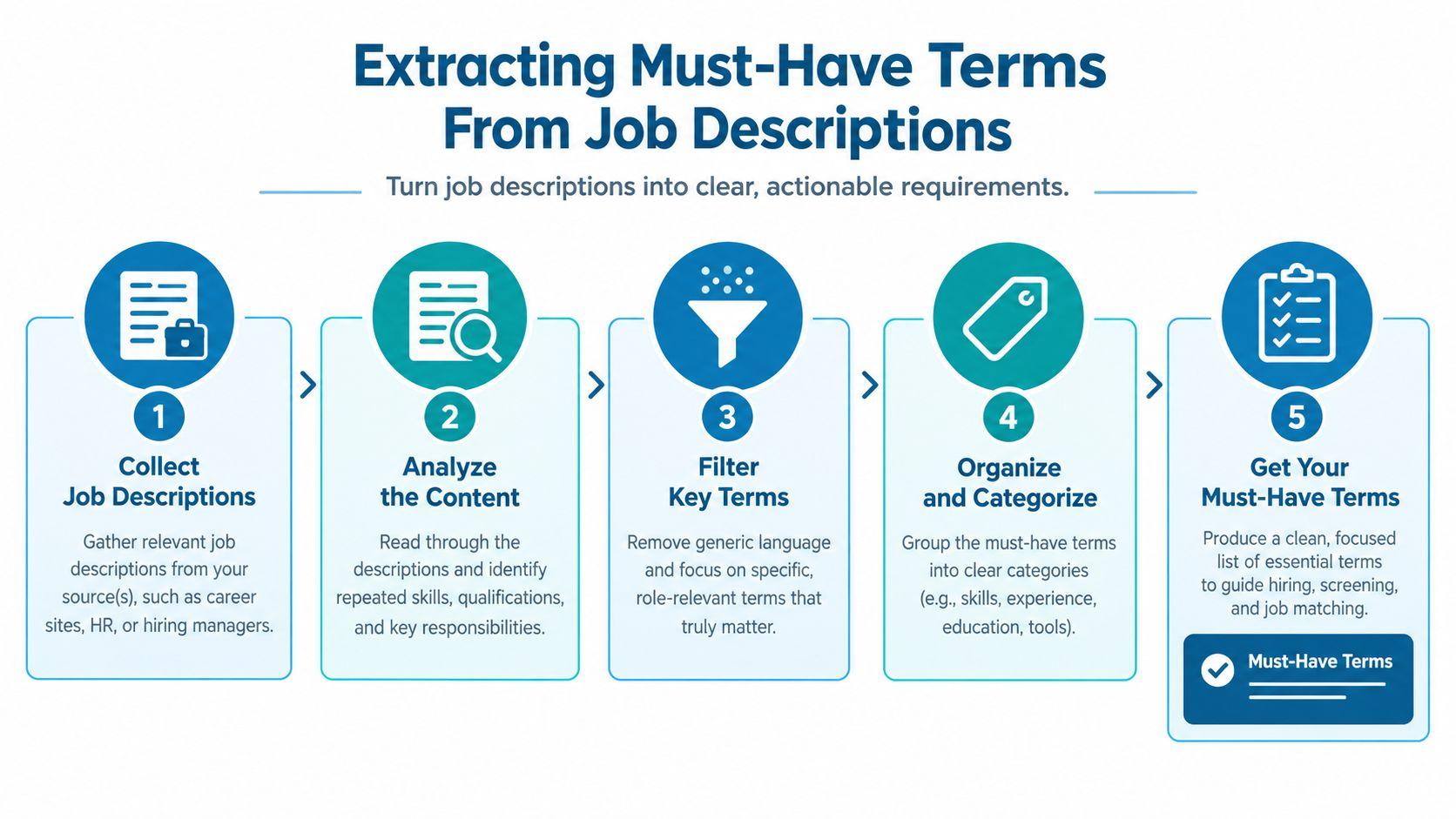
Build a ranked extraction workflow
-
Read for role logic first. Review the title, reporting line, responsibilities, qualifications, location, and working model before highlighting terms. A platform named in a core responsibility may carry more weight than a soft skill mentioned once near the end.
-
Pull exact phrases into a working list. Extract roughly 15–25 terms, including job titles, hard skills, platforms, certifications, degrees, methodologies, compliance language, and domain terminology. JobWizard’s keyword-matching workflow provides useful context for exact-match workflows. Record the wording as published before adding related variants.
-
Rank requirements by hiring signal. Tag “required,” “must have,” and repeated qualifications as high priority. Put “preferred,” “nice to have,” and optional tools in a secondary group. A preference should not displace a repeated requirement when resume space is limited.
-
Test the list against a real posting. For a Product Manager role, an excerpt might read:
Own the product roadmap and quarterly prioritization.
Lead customer discovery interviews and translate findings into requirements.
Partner with engineering and design in Agile delivery.
Use analytics to measure adoption and product performance.
The resulting list could be ranked as:
- High priority: product roadmap, product prioritization, customer discovery, requirements, Agile, product analytics
- Secondary: engineering collaboration, design collaboration, user adoption, product performance, quarterly planning
A named platform, certification, or industry term would move into the appropriate group if the posting included it. Compare wording across Product Manager job listings, then let the target advertisement determine the final set.
- Capture variants without losing exact strings. Create paired entries such as software development life cycle, SDLC or key performance indicators, KPI when both accurately describe your experience. Parser behavior varies, so preserve the full term and acronym rather than assuming one form covers both. Use the same discipline for regional titles, certifications, and spelling differences in international or remote applications.
Finally, check whether your background can prove every high-priority term. Repetition across the summary, responsibilities, and qualifications signals employer intent, not permission to stuff the phrase into every bullet. If the list exceeds 25 plausible terms, rank it by requirement strength, repetition, specificity, and available evidence.
Embedding Keywords Naturally Across Your Resume
A keyword list has no value if the parser can’t locate it or a recruiter can’t understand it. Use three dependable zones: Summary, Skills, and Experience. Conventional headings help the system identify those zones, while context shows the human reviewer that the terms represent real work.
Use each resume zone for a different job
The Summary should establish role identity and the strongest fit signals. Include the target job title when it truthfully reflects your background, then add a few high-priority capabilities in a readable sentence. Don’t turn the summary into a compressed keyword inventory.
The Skills section is useful for tools, methodologies, certifications, and capabilities that may be difficult to quantify in a bullet. Keep the heading conventional, group related skills sensibly, and preserve the employer’s exact phrasing. A clean list is easier to parse than a graphic skills chart, rating scale, or decorative sidebar.
The Experience section carries the proof. A bullet should connect an action, the relevant keyword, and an outcome:
- Action: Built or led something specific.
- Keyword: Name the exact tool, method, or responsibility from the posting.
- Evidence: Explain the result, scope, reliability improvement, or measurable business effect when you have accurate information.
A keyword-rich bullet without an outcome is weaker than a concise accomplishment that demonstrates how you used the skill. Expert guidance recommends measurable proof such as percentages, scale, or reliability improvements, but only include figures you can defend. Don’t manufacture metrics to make a parser happier.
Keep formatting boring on purpose
Avoid columns, graphics, text boxes, unusual section names, and information embedded in headers or footers. A plain-text review is one of the fastest ways to find hidden failures. Copy the resume into a plain-text editor and check whether headings, dates, titles, bullets, acronyms, and keywords remain in the correct order.
The trade-off is visual originality. A highly designed resume may look impressive in a human preview, but unconventional layouts can cause the parser to merge columns, skip text, or attach a skill to the wrong job. Monster’s resume keyword guidance cites industry guidance that 99% of Fortune 500 companies use ATS, which makes parser-friendly structure particularly important for large-employer applications.
Recruiter’s test: If a hiring manager can’t tell where you used the keyword, the ATS match won’t rescue the application.
Adapting Keywords for Remote and International Roles
A keyword strategy built for a domestic office role can miss the terms that determine whether an international or remote application is even viable. Generic language such as remote, international, or communication rarely answers the operational questions employers and candidates need to resolve.
For remote work, inspect the posting for explicit language about asynchronous collaboration, documentation, distributed teams, time-zone overlap, remote access, and the communication tools used by the team. Mirror only the phrases that describe your actual experience. “Worked with distributed teams” is useful when supported by a clear example, while a long list of remote-work buzzwords looks artificial.
Treat eligibility language as a separate keyword family
International roles often contain terms tied to visa sponsorship, relocation, work authorization, immigration, regional compliance, or a specific visa category. If the employer names a category, use that exact wording only when it accurately reflects your situation or the requirement you’re addressing. Don’t imply sponsorship eligibility, authorization, or relocation readiness that you don’t have.
Market-specific language also changes by sector and geography. A compliance term, regional framework, local job title, or platform name may carry more weight than a universal soft skill. ResumeAdapter’s discussion of ATS keyword localization highlights the gap between universal keyword lists and market-specific variants, including visa language, remote phrasing, and evolving skills-based hiring terms.
Use a two-layer process:
- Extract role terms from the posting, such as the title, tools, responsibilities, and qualifications.
- Extract eligibility terms from the location, work arrangement, sponsorship statement, and compliance requirements.
Then verify that your resume states location and authorization information clearly where appropriate. Don’t bury it in a decorative header that may disappear during parsing.
For candidates comparing global opportunities, remote job listings on JobGlance provide a useful way to inspect how employers distinguish domestic remote work from broader work-from-anywhere language. The important principle is not to assume that “remote” means globally eligible. Read the geographic condition as carefully as the technical requirements.
Testing and Troubleshooting Your Resume Match Score
A polished resume can still fail if the parser cannot read it. Treat a match score as a diagnostic signal, not an interview guarantee. Test the customized file against the exact posting, then investigate every missing term before editing.
Run a pre-submission test
Paste the job description and your customized resume into a reputable scanner or comparison tool. Separate genuine experience gaps from parser errors and wording differences. Modern ranking systems may recognize related concepts, but exact string matches still matter for many screening workflows.
For each missing keyword, choose the appropriate fix:
- The experience is absent. Do not add it. Reconsider the role or accept the gap.
- The wording differs. Use the employer’s exact phrase when it accurately describes your work.
- The acronym is missing. Include the full term and acronym where the line remains readable.
- The parser missed the section. Replace unusual formatting with a conventional heading and simpler structure.
- The term lacks evidence. Put it in an accomplishment bullet that shows how you used it, or remove it from the list.
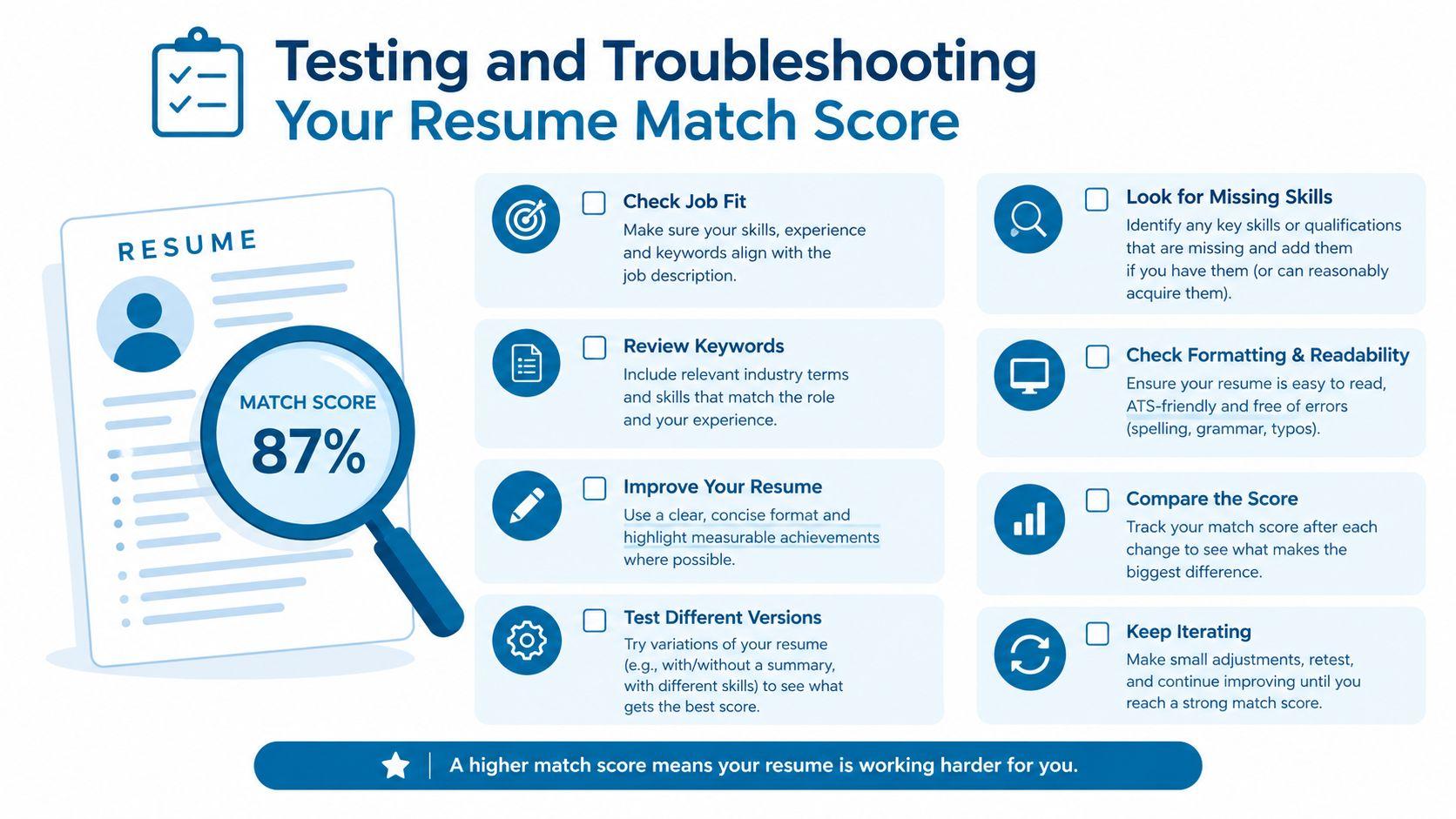
Perform the plain-text inspection
Export the final file and paste it into Notepad or another plain-text editor. Search for your three highest-priority keywords. If a term lands inside a header or footer, appears in the wrong sequence, or separates from the role it supports, rebuild that area with single-column headings and standard text blocks.
Standard headings, plain text, and restrained formatting give parsers a clearer input. Put important terms in the summary, skills, and experience sections rather than relying on graphics, tables, or columns. A formatting recommendation can guide the test, but your own extracted text is the decisive check.
Do not chase a higher score by stuffing every missing phrase into Skills. A strong apparent match built on unsupported claims creates problems during recruiter review and interviews. Prioritize relevant terms you can prove, repair representation errors, and then read the resume as a person would.
Troubleshooting principle: Fix the representation before expanding the vocabulary. One accurate phrase in the right section is more useful than another synonym trapped in a broken layout.
Finalizing Your Application Strategy
Keyword optimization works when it mirrors employer language and clarifies genuine fit. It doesn’t work as a trick, and it can’t compensate for missing experience, misleading claims, or a resume that a parser can’t interpret.
Maintain a master resume with your complete, accurate background, then create a customized version for each serious application. Pull the highest-priority terms from the posting, map them to the Summary, Skills, or an Experience bullet, and remove anything that doesn’t support this role. Keep a record of the wording you used so you can prepare for interviews without forgetting which tools or responsibilities you highlighted.
A job-search platform can reduce the manual work of finding roles worth tailoring for, but it shouldn’t replace judgment. JobGlance, for example, scores roles against a user’s resume, highlights matched and missing keywords in the job description, and provides an ATS Resume Builder that checks formatting and creates single-column, text-preserving output. Use tools like that to prioritize applications, then validate every suggested term against your actual experience.
For help organizing the surrounding process, tagged job application resources can complement your resume workflow with practical material on applications and follow-up. Stop editing when the resume accurately covers the role’s important language, passes the plain-text check, and gives a recruiter clear evidence of relevant work. Then submit, track the application, and move to the next qualified opportunity.
JobGlance helps international and remote job seekers find roles ranked by resume fit, with matched and missing ATS keywords visible for each job. Use its resume builder and job-specific scoring to tailor applications more efficiently, then visit JobGlance to start finding roles that fit your experience and eligibility.
Keep reading


