Remote Job Requirements: What Employers Really Check


On this page
The most popular advice about remote job requirements starts with self-discipline, a laptop and good Wi-Fi. That’s the wrong order. Before an employer cares about your home office, they need to know whether they can legally employ you where you’ll work.
Treat remote as a bundle of conditions, not a benefit that overrides the rest of the listing. Your right to work, approved location, equipment, security readiness and availability each need separate evidence. A strong application makes those conditions easy to verify instead of asking a recruiter to infer them.
Remote Job Requirements at a Glance
A listing that says little beyond remote leaves the important questions unanswered. It doesn’t establish whether you can work from another country, use your own laptop or choose your own hours. Those are separate permissions.
The distinction matters because remote work is substantial without being the default. The U.S. Bureau of Labor Statistics reported that 35.5 million people teleworked or worked from home for pay in the first quarter of 2024, representing 22.9% of all people at work. Those figures describe working arrangements, not unrestricted access to those jobs.
Use the following categories to inspect what an employer permits.
Remote job requirements by category
| Requirement | What Employers Specify | Where It Appears | Proof They Ask For |
|---|---|---|---|
| Legal eligibility | Right to work in a named country; sponsorship or not | Eligibility line, must-reside wording | Work authorization or visa status |
| Tax and work location | Approved countries, maximum days abroad, employer entity | Contract location clause, employer-of-record note | Country of residence, tax documents on request |
| Equipment | Laptop specifications, operating system, webcam, headset, company-supplied or BYOD | Hardware or device policy, onboarding email | Device details, speed test result |
| Workspace | Private room for confidential calls, stable connection, backup connection | Job description, interview questions | Written setup statement |
| Security | Managed or approved device, MFA, VPN or zero-trust access | Security section, IT onboarding | Authenticator app or hardware key, VPN experience |
| Communication and time zone | Core hours, overlap window, response times, tools | Working-hours line, team location | Stated availability in the team’s time zone |
Read the table from the top down. Legal eligibility decides whether the remaining checks are worth completing. Buying equipment won’t fix a hiring-country restriction, and being available during the team’s workday won’t create work authorization.
Don’t mistake a missing requirement for permission. Mark it as unresolved and identify who can confirm it, usually the recruiter for eligibility, the hiring manager for working hours and IT for device rules.
Pre-application rule: Match each condition to evidence. A location badge is not evidence for everything underneath it.
Keep this table beside the listing as a checklist. Give each row its own status rather than assigning the entire opportunity a single remote or not-remote label.
Eligibility and Tax Limits Behind Remote Listings
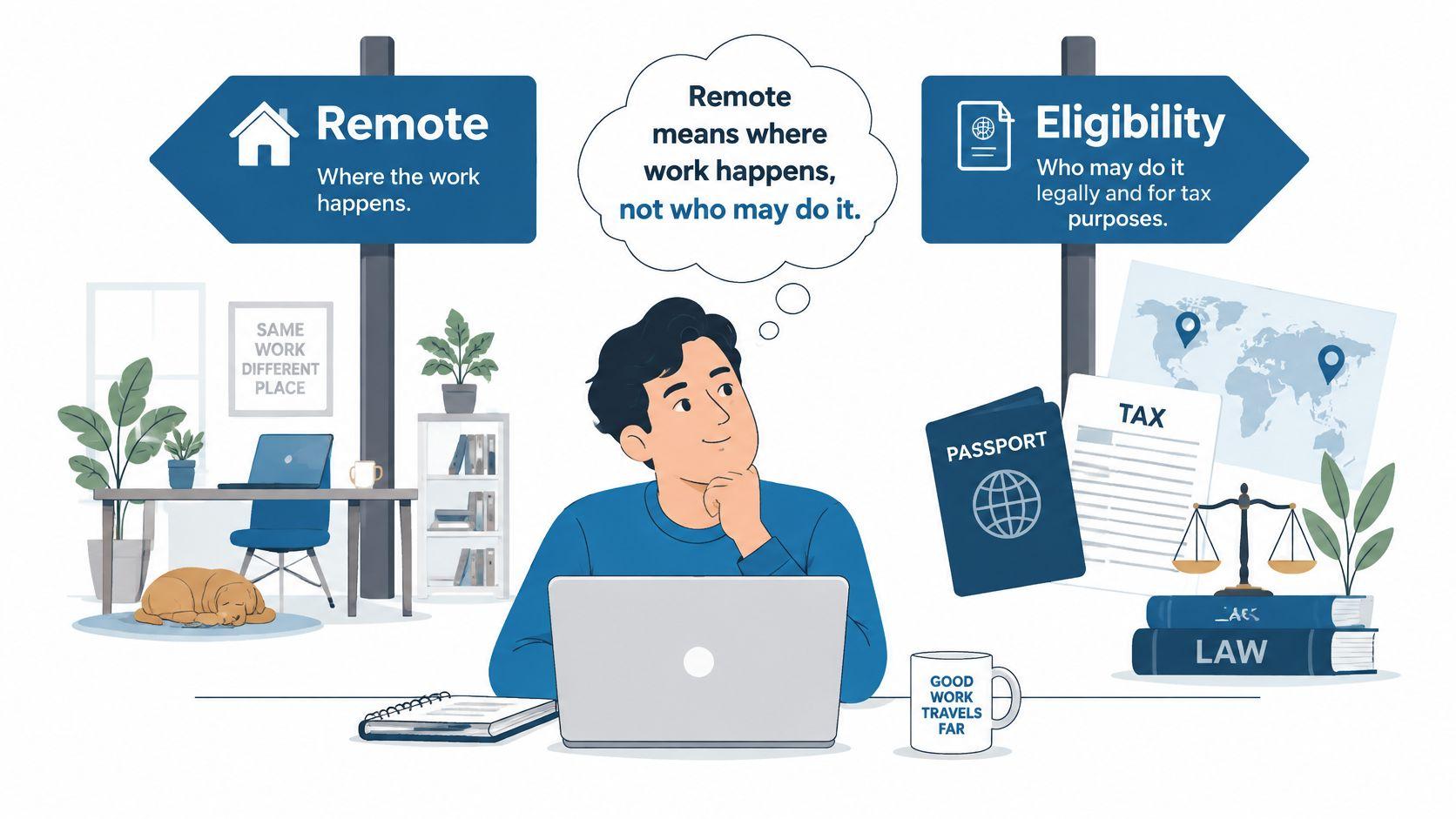
Remote describes where work happens, not who may do it. In Deloitte’s Global Remote Work Survey, the employee’s existing legal right to work was the most frequently cited employer guardrail, named by 64% of respondents. Don’t assume an employer will arrange immigration permission just because you won’t attend an office.
Your physical working location matters independently of the employer’s headquarters. State where you’ll perform the work, not just your nationality or the country where you hold a bank account.
Listing wording and what it permits
Use these confidence levels to judge the clarity of the hiring route. High confidence doesn’t mean guaranteed eligibility or an offer. It means there’s a specific arrangement you can verify.
| Listing Wording | What It Usually Permits | What You Must Prove | Confidence Level |
|---|---|---|---|
| Remote, [country] only | Home working within that country; local authorization normally required unless sponsorship is offered | Right to work in that country | High |
| Remote, open to [region] | Working from approved countries where the employer can hire | Residence in a listed country | Medium, confirm the country list |
| Work from anywhere, no sponsorship line | Potential international hiring, subject to approved locations and travel rules | Residence country, planned locations, days abroad | Medium, verify in the contract |
| Global remote via employer of record | Local employment and payroll through an employer of record | Residence in a supported country and eligibility for the local contract | High once the EOR and country coverage are confirmed |
| Visa sponsored | Employer-supported immigration process, with candidate applications or documentation as required | Role eligibility and any applicable salary threshold | High only after the sponsorship route and required employer authorization are verified |
| Hybrid, remote possible | Regular office attendance, with remote days subject to agreement | Ability to commute and attend the office | Low, ask before applying |
A country-only listing is the clearest restriction. If you’re outside that country, don’t treat matching technical skills as an exception.
A regional listing needs a country list. An employer accepting applicants across Europe, for example, may not support employment in every European jurisdiction.
An employer-of-record arrangement is more concrete, but the provider must support your location and the proposed employment. Ask who will sign your contract and which entity will run payroll.
Sponsorship is a different question from international remote hiring. If you need immigration support, start with visa-sponsored jobs and verify the actual route rather than treating an international team as proof of sponsorship.
When a listing names no countries, treat payroll coverage in your country as unconfirmed. Don’t build an application around an assumption the recruiter hasn’t validated.
Why staying below a day limit isn’t enough
The 183-day rule isn’t a universal safe harbor. Bloomberg Tax’s explanation of international remote-work arrangements notes that under Article 15(2) of the OECD Model Tax Convention, the host country may obtain taxing rights when presence exceeds 183 days or when an employer permanent establishment there bears the salary; some jurisdictions impose obligations at lower thresholds or based on home-office or representative presence.
That doesn’t give you a personal allowance to work abroad without approval. Tax-treaty conditions, local rules and the employer’s circumstances still matter.
Cross-border work can also expose employers to corporate tax, payroll registration, withholding and reporting obligations, as Covington’s guide to international remote-working risks explains. That’s why the contract can contain tighter travel limits than the posting suggests.
For an applicant, the practical consequences are straightforward:
- Describe authorization accurately. List countries where you hold permission to live and work, and separate those from places where you can only visit.
- Disclose planned overseas work. Expect questions about destinations, dates and days worked abroad.
- Prepare documentation. Tax-residency or social-security documents may be requested through an appropriate secure process.
- Confirm contract status. A contractor agreement changes the arrangement, but it doesn’t erase tax or immigration questions about where you perform the work.
Don’t try to solve the employer’s tax position yourself. Get written approval for your proposed location and obtain qualified advice for your own cross-border obligations.
Equipment and Workspace Employers Expect
Your setup is a delivery requirement, not a background detail. A survey study of people working from home involving 1,516 respondents found productivity was most strongly correlated with a suitable work location and appropriate technical equipment. That supports asking about readiness, not demanding that every applicant buy an elaborate office.
Check the setup before buying anything
-
Workspace. Identify a dedicated, low-distraction room where you can take confidential calls. Check background noise, screen visibility and whether other people can overhear customer or employee information.
-
Connection. Test sustained video calls and cloud applications from the place you’ll work. If the posting specifies minimum download and upload speeds, measure against those requirements; don’t substitute a universal internet-speed recommendation. Arrange a backup, such as a mobile hotspot, and test it.
-
Hardware. Confirm that your computer runs a supported operating system and can handle the role’s applications. Test your headset microphone and webcam, not just whether the devices connect.
-
Policy. Establish whether the employer supplies hardware, permits personal devices or requires a particular operating system. Ask about undisclosed hardware rules before accepting, and don’t purchase a machine before receiving the specifications.
For phone-heavy roles, distinguish ordinary video meetings from business calling. SnapDial’s resource on choosing a hybrid work phone solution can help you identify questions about calling arrangements and supported equipment without assuming your personal phone is the answer.
Describe the setup you have. If equipment will be supplied after hiring, say what you’re ready to receive or configure rather than pretending it’s already installed.
Adapt this application line, removing anything that isn’t true:
I work from a private room on a laptop running [OS], with a wired connection, a backup hotspot, a headset and a webcam, and a recent speed test result of [download/upload].
Security Controls That Shape Device Requirements
A working laptop isn’t necessarily an approved laptop. When a role involves corporate systems, the employer needs to control how your device authenticates, connects and handles information.
NIST’s guidance on enterprise telework and remote-access security recommends two-factor authentication, with a factor supplied by a separate device, and protection through approved cryptography or a VPN/TLS tunnel. It also recommends separating access according to the connecting device’s trust level, particularly when personal devices are permitted.
What you should be ready to use
- An organization-managed laptop or approved personal device. BYOD means bring your own device, not bypass company controls. Establish whether management software is required and what it can access.
- Current operating-system patches. You need to accept updates and follow the employer’s maintenance process, rather than postpone patches indefinitely.
- An approved MFA method. Expect an authenticator app or hardware security key. Never share authentication codes as evidence of readiness.
- The company’s remote-access system. Be prepared to use its VPN or zero-trust gateway and follow access restrictions.
Ask about compatibility before the start date. A personal computer that handles your work applications may still be unsuitable for the employer’s endpoint-management tools.
What disabling split tunneling changes
Split tunneling lets some traffic bypass the VPN. When it’s disabled, traffic from the device goes through the VPN rather than allowing other connections to travel directly over an untrusted network such as public Wi-Fi. That reduces what an attacker on that local network can observe, although routing traffic through the company connection can introduce slower speeds or connection friction.
Don’t work around those controls to make an application faster. Report the problem to IT and use the approved alternative.
These protections don’t establish that every request is legitimate or that every employee needs access to every system. Identity verification, least-privilege access and prompt incident reporting still apply, even on a managed device with an active VPN.
Time Zone and Communication Norms to Check
A remote role can offer location flexibility while requiring a tightly defined working day. The overlap window is the period when your working hours and the team’s working hours coincide. Calculate it before describing yourself as flexible.
For a hypothetical pair of standard 9-to-5 schedules, a three-hour difference leaves five shared hours, while an eight- or nine-hour difference leaves no overlap unless someone shifts their schedule. Check the actual dates too, because daylight-saving changes can alter the difference.
Get the operating rules in writing
Grant Thornton’s remote-working guidance identifies location, working hours, availability, communication channels and conditions for working outside the office as matters to define explicitly. It also explains that flexible schedules remain subject to applicable working-time and rest requirements, including those under the EU Working Time Directive.
Look for specific answers rather than a promise of flexibility:
- Core hours. Which hours must everyone attend, and in whose time zone?
- Response expectations. Is an example standard such as replying to non-urgent messages within one business day the team’s rule, or merely your assumption?
- Communication channels. Does the team use Slack for questions, Teams for calls and Jira for task status?
- Documentation. Are decisions recorded for colleagues who aren’t online, or made in meetings you would miss?
- Meeting load. Ask which recurring meetings are mandatory and whether customer calls add scheduling constraints.
A useful distinction is async-first versus meeting-dependent. Async-first teams still need deadlines and handoffs; meeting-dependent teams require more simultaneous availability, whatever their location policy says.
Give the recruiter a sustainable availability window, not the hours you could tolerate briefly to secure an offer.
As a personal screening test, name your core hours and identify whether you could cover at least two meetings a week within the required overlap. If you can’t, say so before scheduling interviews.
How to Prove Each Requirement in Your Application
Recruiters shouldn’t have to reconstruct your eligibility from your address, employment history and profile headline. Give them a concise statement they can compare directly with the listing.
Keep a private requirements worksheet, then transfer only the relevant proof into the application. Confirm your status first; provide sensitive documents later through a verified, secure process.
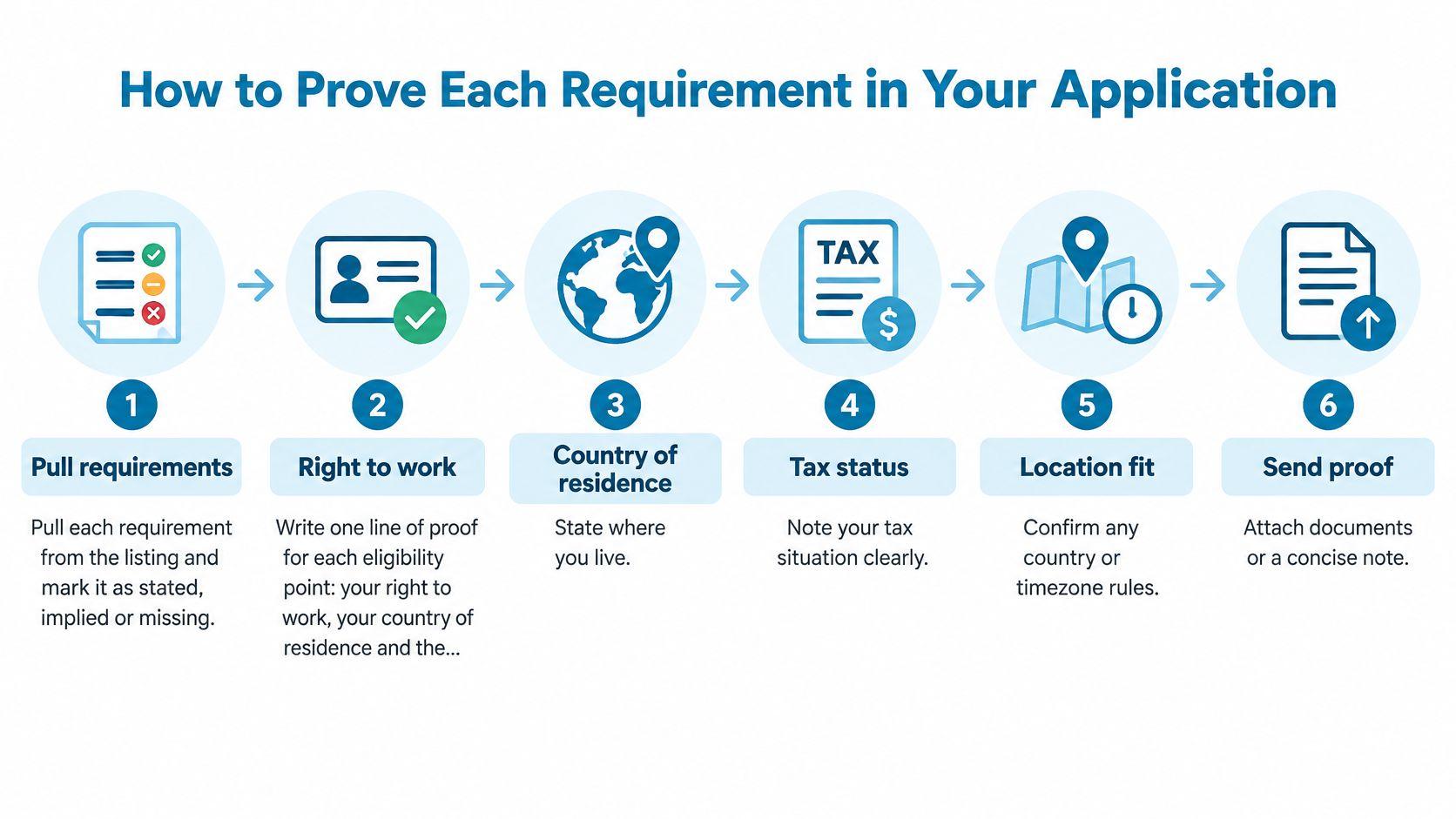
Build a concise evidence record
-
Extract the requirements. Pull each condition from the listing and mark it stated, implied or missing. Record the relevant wording so you can distinguish an explicit restriction from your interpretation.
-
Write an eligibility line. State your country of residence, existing work authorization and approved locations you can work from. If sponsorship is required, say so directly instead of answering as though visitor permission were employment authorization.
-
Add your setup statement. Include device, operating system, workspace, headset, webcam and a recent speed-test result when requested. Don’t add specifications you haven’t checked or promise equipment you don’t own.
-
State security readiness. Describe experience with managed devices, your approved MFA method and VPN use. Name the process or tool, but never include credentials, recovery codes or screenshots exposing company systems.
-
Convert your availability. Give a concrete window in your local time and the team’s time zone, including the time-zone label. Check that the conversion matches the proposed work dates and identify the overlap you can reliably cover.
-
Show communication evidence. Describe a real example of documented handoffs, written decisions or project updates across time zones. Connect the tool and cadence to an actual result, using only outcomes you can substantiate.
-
Place proof where screeners look. Answer the screening form precisely, put the eligibility line near the top of the cover letter and include relevant remote tools in your resume’s skills section. Don’t bury a country restriction beneath a long personal introduction.
-
Resolve missing information before the interview. Ask a focused recruiter question for each unresolved condition. For example, ask whether the company can employ a resident of your country through a local entity or employer of record.
Replace adjectives with evidence
A statement such as excellent communicator doesn’t tell a hiring manager how you work. A stronger application describes maintaining Jira handoffs, recording decisions in shared documentation or sending written updates that let colleagues continue without a live call, provided that’s your actual experience.
The common mistake is claiming readiness without showing it. Replace each broad claim with a specific status, tool, working window or verifiable example.
Filter for Global Remote and Confirm Before You Apply
A “remote” label does not tell you whether you can legally take the job. The KPMG global mobility analysis reports that 83% of surveyed jurisdictions had not taken an official position on updated international tax guidance, 87% lacked tax-authority guidance on permanent-establishment profit allocation, and 48% relied on employee self-reporting. Treat global availability as a claim to verify, not permission to work from anywhere.
Use filters to narrow the field, then check each condition against the listing and the employer’s hiring arrangement.
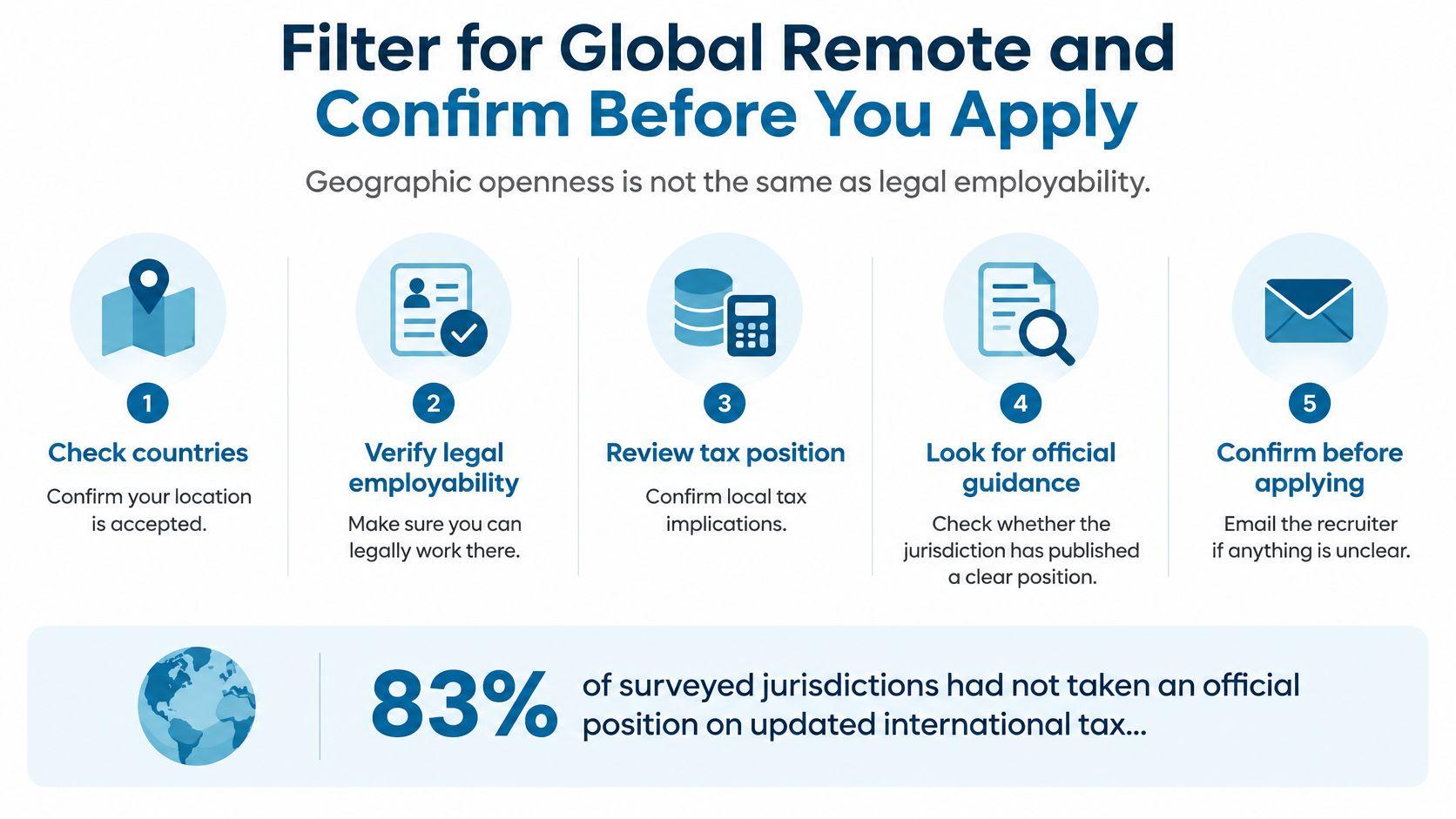
Run the filters in the right order
- Check sponsorship first if you need employer support. Confirm that the employer can offer the immigration route you require before tailoring an application.
- Filter for worldwide roles. Browse work-from-anywhere remote jobs, then confirm that the description accepts applicants in your country.
- Inspect the conditions. Look for approved-country lists, employee or contractor status, and limits on temporary work abroad.
- Check the employer’s hiring pattern. A posting may omit location details even when the company hires globally, but you still need to confirm that your location and work arrangement are eligible.
JobGlance reads its visa-sponsored and globally remote filters from the full job description. It also tracks companies that hire globally by default, so their roles can appear even when a posting does not state that explicitly. A global signal is a useful lead, not proof that the employer can hire you in your country.
For more places to search, Eztrackr’s guide to where to browse remote job listings compares remote job boards. Apply the same location and eligibility checks to every listing.
Apply when the posting and your evidence support eligibility. If either is unclear, ask the recruiter before investing time in the application.
Keep reading


