How to Create an ATS Friendly Resume That Gets You Hired


On this page
A 2025 audit of all 500 Fortune 500 career sites reportedly found a detectable applicant tracking system at 97.8% of companies, or 489 organizations (VisualCV). For applicants targeting large employers, that means a resume commonly enters software before a recruiter reads it.
That changes how you should create an ATS friendly resume. The document isn’t primarily a design object. It’s an information-compatibility layer between your experience and the employer’s hiring system. It must be easy for software to extract, easy for a recruiter to scan, and precise enough to represent international credentials, remote experience, and transferable skills without distortion.
Why an ATS Friendly Resume Is Your First Hurdle
An Applicant Tracking System, or ATS, collects applications and turns resumes into structured information. It may extract your job titles, employers, employment dates, skills, education, certifications, and contact details, then make those fields searchable or filterable for recruiters. Some systems support ranking and workflow management, but the recruiter usually remains responsible for the final decision.
The practical problem is simple. A human can understand that “client success lead” resembles “Customer Success Manager,” or that an international qualification is relevant to a local role. A parser may not make that connection reliably unless you explain it in familiar, explicit language.
Practical rule: Build a resume that can be understood in plain text before you make it visually attractive.
The Fortune 500 finding doesn’t prove that every ATS automatically rejects resumes, and it doesn’t show that keywords alone determine hiring outcomes. It does establish why machine readability deserves attention, particularly for candidates applying across borders or to remote roles. A resume designed for a software engineer role with visa sponsorship must communicate eligibility-relevant experience without relying on visual cues that software may ignore.
What the system needs to recognize
Think of your resume as a set of labeled records:
- Role and employer: Use a clear title, company name, and location where relevant.
- Dates: Put employment dates in normal document text and keep their order consistent.
- Skills: Name tools, methods, certifications, and technologies directly.
- Evidence: Connect skills to responsibilities, projects, and outcomes.
- Contact details: Keep your name, email, phone, and location in the document body.
For international applicants, add truthful equivalents when terminology differs. You might write “customer relationship management (CRM)” followed by the platform you used, or clarify an unusual internal title with a familiar equivalent in parentheses. For remote candidates, describe distributed collaboration, asynchronous communication, virtual project coordination, or work across time zones when those activities reflect your experience.
The objective isn’t to trick a filter. It’s to make your qualifications searchable in the same vocabulary the employer uses, while preserving enough context for a human reviewer to trust what they see.
The Unbreakable Rules of ATS Resume Formatting
Formatting errors often happen before the writing begins. A resume can contain excellent experience and still lose information during extraction if the layout forces software to guess where one field ends and another starts.
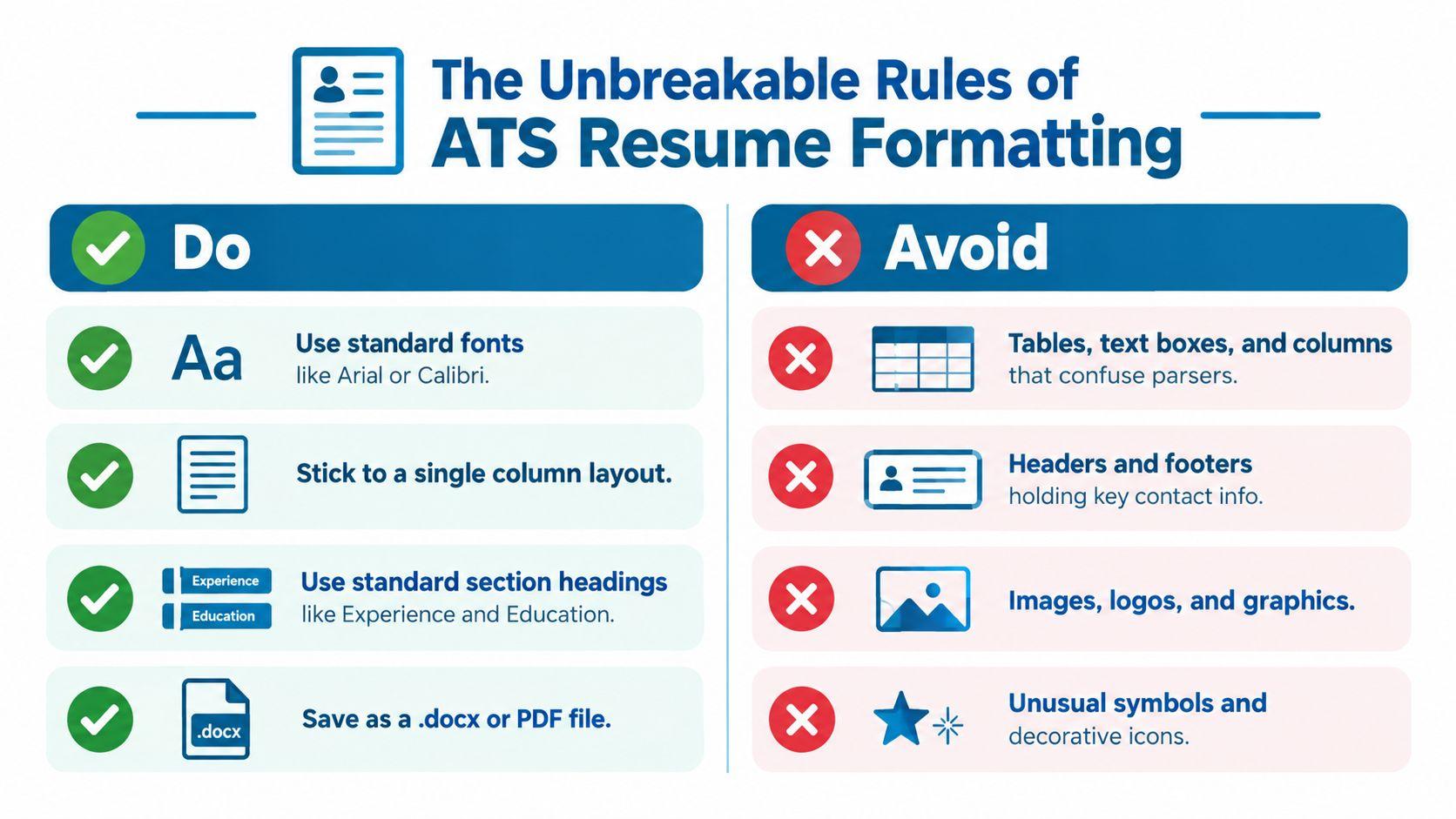
Start with a single-column, reverse-chronological layout. Put your most recent role first, then move backward. Use ordinary headings such as Summary, Work Experience, Education, Certifications, and Skills. Standard fonts, including Arial or Calibri, reduce ambiguity, while conventional bullets make individual achievements easier to isolate.
The format decisions that matter
| Use | Avoid |
|---|---|
| A single column with a clear top-to-bottom reading order | Multiple columns that may be read across the page unpredictably |
| Standard section headings such as Experience and Education | Decorative headings that don’t identify the section clearly |
| Plain paragraph text for contact details, dates, and job information | Headers or footers containing essential information |
| Standard fonts and familiar bullet characters | Icons, unusual symbols, graphics, logos, and skill bars |
| A clean DOCX or text-preserving PDF, according to the employer’s instructions | Scanned documents, image-based files, tables, and floating objects |
Reported ATS evidence indicates that 25% of systems can fail to parse contact information placed in headers or footers, while text boxes, tables, graphics, and complex columns can also be misread (LinkedIn). Put your email and phone number directly beneath your name in the main body. Don’t place them inside a banner only because it looks cleaner.
Make the structure predictable
Write dates in a consistent form, such as “March 2022 to Present” or “March 2022 to June 2024.” Keep the employer, title, dates, and location close together, then place achievement bullets underneath. A resume for a career changer or someone with gaps can still use a chronological or combination structure, with a short summary explaining the transition and a dated history that remains easy to interpret.
If you want visual inspiration without copying risky layouts, you can browse design resume strategies for ideas, then remove any element that hides text or disrupts the document’s reading order. Use color sparingly, and never depend on color to communicate a skill level or category.
The design trade-off is real. A portfolio, personal website, or networking version can showcase branding and visual work. The upload version should prioritize stable extraction over decoration. Before submission, follow the employer’s requested file type. Keep an editable DOCX master, and if the instructions are unclear, test both DOCX and PDF rather than assuming one format works everywhere.
Matching Keywords Without Sounding Like a Robot
Keyword alignment works when it connects terminology to credible evidence. It fails when a candidate copies a job description into a Skills section without showing where or how the skill was used.
Begin by extracting five groups from the posting: the exact role title, required technical skills, software, certifications, and recurring responsibilities. Then compare those terms with your actual experience. Mark each as a direct match, a truthful equivalent, or a gap that shouldn’t be claimed.

Put the language where it proves something
Suppose a posting asks for product discovery, stakeholder management, SQL, and experimentation. A weak resume might list all four terms without context. A stronger version places them in the Skills section and connects them to dated work:
- Product discovery: Interviewed users, synthesized feedback, and translated findings into a prioritized roadmap.
- Stakeholder management: Coordinated engineering, design, sales, and operations around release decisions.
- SQL: Used SQL to investigate product behavior and support prioritization.
- Experimentation: Defined hypotheses and evaluated test results before recommending changes.
Indeed’s ATS guidance recommends including priority skills from the job description approximately two to three times, using singular and plural forms where relevant, and placing terms across the summary, Skills, and experience sections (Indeed). Treat that as a placement guideline, not permission to repeat a phrase mechanically.
Use the full term and abbreviation when both are common and truthful. “Search Engine Optimization (SEO)” helps a system and a recruiter recognize the same capability under different wording. For international candidates, include equivalent terminology only when it accurately describes your work. Don’t replace an official title with a more familiar one unless you preserve the original or clearly explain the equivalence.
Turn duties into evidence
A keyword becomes persuasive when a bullet answers three questions: what did you do, with which tool or method, and what changed as a result? Avoid vague statements such as “worked on digital projects.” Name the activity, platform, or process and describe the outcome qualitatively when you don’t have a defensible number.
For a role such as Product Manager, “managed the product roadmap” is less useful than “prioritized roadmap items from customer research, support trends, and engineering constraints.” The second version contains recognizable language and gives the recruiter a reason to believe you used the skill.
Never hide keywords in white text, tiny type, or invisible objects. Hidden content can create extraction problems and undermines trust when a human opens the file. The safest optimization is honest repetition with context.
Using Smart Tools to Build and Tailor Your Resume
Manual tailoring is manageable until every application requires a different title, terminology set, file format, and evidence selection. A resume builder can reduce structural mistakes, but it shouldn’t replace judgment. The tool should enforce a readable foundation while you decide which achievements fit the role.
JobGlance’s ATS Resume Builder scores an uploaded resume against five ATS checks, rebuilds it in single-column templates, supports an existing PDF or DOCX, and can export a text-preserving PDF. Its resume matching view highlights matched and missing job-description keywords, which gives you a practical editing list rather than a generic instruction to “add more keywords.”
Automation needs a human control layer
AI-assisted hiring makes accurate tailoring more important, but it also makes over-optimization risky. iHire reported that among employers using AI in 2025, 32.1% used it to screen applicants or resumes, up from 11.6% in 2024. The same report found that 90% of job seekers wanted companies to disclose AI use (iHire).
Those figures describe adoption and candidate expectations, not a guaranteed scoring formula. An automated tool can identify missing terminology, but it can’t decide whether your international project is equivalent to the employer’s requirement, whether a credential transfers across jurisdictions, or whether a bullet overstates your responsibility.
Use a builder for repeatable mechanics:
- Import your master resume: Keep a complete version with every relevant role, project, skill, and qualification.
- Select the target posting: Compare the document with the exact role rather than a generic industry profile.
- Review missing terms: Add only the skills and phrases supported by your experience.
- Rewrite evidence bullets: Show the skill in a responsibility, project, or result.
- Export and inspect: Treat the final file as a new deployment artifact, not as an unchanged draft.
Freelancers and contract workers also need a reliable system for separating client work, tools, and outcomes. A broader collection of top freelance productivity tools can help with workflow organization, but no productivity tool can validate a claim you haven’t checked yourself.
The best use of automation is constrained assistance. Let software surface gaps and enforce structure. Keep ownership of the facts, terminology, and examples that make the resume credible to a recruiter.
The Final Check How to Guarantee Your Resume Is Parsable
Visual inspection isn’t enough. A document can look perfect in Word or a PDF viewer while its extracted text places the right column before the left column, separates a job title from its employer, or drops contact details entirely.
Run the plain-text test
Save the exact file you plan to upload. Then copy all its text into Notepad, TextEdit, or another plain-text editor. Review the result from top to bottom.
Check these items:
- Identity: Your name, email, phone, and location appear in the main sequence.
- Section order: Summary, Experience, Education, and Skills remain identifiable.
- Employment history: Each employer stays attached to the correct title and dates.
- Bullets: Achievements appear beneath the right role and don’t merge together.
- Symbols: No critical characters, dates, or technology names have become garbled.
- Keywords: The important terms from the target posting are present in natural context.
Sources discussing parser behavior identify multi-column layouts, tables, text boxes, headers, footers, graphics, and contact information outside the main document body as common causes of scrambled or missing content. The same guidance recommends copying or exporting the text and confirming that every element appears in logical order (Hireflow).
Test the submission version, not only the master
If you edit a DOCX and submit a PDF, test the PDF. If an employer asks for DOCX, test that DOCX in a second application before uploading. Keep the file name descriptive, such as Firstname_Lastname_TargetRole.docx, and compare the extracted text against the job description one final time.
For candidates with visual impairments, this check serves another purpose. A 2025 study of 99 resumes from job seekers with visual impairments found an average ATS parse rate of 84.22%, with results ranging from 40% to 100%. Chronological and combination resumes had mean parse rates of 88.06% and 87.50%, compared with 55.33% for functional resumes (Mississippi State University%20Resumes%20of%20job%20seekers%20w%20VI.pdf)).
That evidence reinforces a useful principle: accessibility and ATS compatibility often improve together when the document has a predictable reading order, explicit dates, conventional headings, and a text layer that survives extraction. A simple resume isn’t less professional. It gives more readers and systems a fair chance to understand your background.
Your Resume Is Ready What’s Next
An ATS-friendly resume follows a straightforward sequence: format for the machine, write for the human, and validate the output. Use a single column, standard headings, honest keyword alignment, and evidence-rich bullets. Then inspect the extracted text before every important submission.
This process matters even more when you’re applying internationally. Remote eligibility, sponsorship expectations, local title equivalents, and unfamiliar credentials need to appear in plain language, not remain implied by a visual template. Pair the resume with an effective cover letter approach when the application gives you space to explain motivation, relocation, or work authorization context.
When the document is ready, target roles that match your actual constraints. Start with remote entry-level opportunities if you’re building experience in distributed work, and use the same disciplined matching process for each application rather than sending one generic resume everywhere.
JobGlance helps international and remote candidates find roles, compare resume fit, and prepare applications with ATS-oriented resume tools in the same workflow. Build or tailor your resume, then visit JobGlance to find relevant opportunities and apply with a document that both software and recruiters can understand.
Keep reading


